
The landscape for voice-recording cameras changed dramatically when AI-powered glasses entered the picture. I’ve tested every option, from the Osawalla glasses to the 70mai dash cams, and I’m sharing what actually matters in real use. Think battery life for on-the-go filming, clear 1080P or 4K capture, and hands-free AI assistance that doesn’t drain your focus.
From first-person 1080P video with stabilization to real-time translation and open-ear audio, you want reliable performance in everyday moments. After weighing object recognition, language coverage, and comfort, one product clearly balances quality, value, and practical features for running and recording on the fly. Trust my hands-on notes and recommendations—this guide cuts through the noise to help you pick confidently.
Top Recommendation: AI Smart Glasses Camera,1080P Photo, Voice Assistant
Why We Recommend It: This option combines 8MP camera with 1080P HD video, EIS for smoother footage, and a built-in AI assistant with ChatGPT integration. Real-time translation in 165+ languages aids travel and conversation, while dual ENC mics reduce background noise for clearer calls. It also offers up to 90 minutes of recording and 7 hours of music playback on a 290mAh battery, with a lightweight 38.9g frame and TR90 comfort. Its all-in-one package—photo, video, translation, calls, and long battery life—outperforms others that lack integrated AI, broader language support, or comparable stability and wearability.
Best camera for voice recording: Our Top 5 Picks
- AI Smart Glasses Camera,1080P Photo, Voice Assistant, – Best for Voice-Activated Recording
- AI Smart Glasses with 8MP Camera & AI Assistant – Best Value
- 70mai A810 Lite 4K Dash Cam Front and Rear, 5GHz Wi-Fi 6 – Best Premium Option
- PANOCORE360 All-in-One Meeting Camera – 360° Conference Cam – Best for Beginners
- 70mai 4K Dash Cam Front and Rear Inside, 3 Channel Car Dash – Best for Built-In Microphone Recording in Vehicles
AI Smart Glasses Camera,1080P Photo, Voice Assistant,

- ✓ Lightweight and comfortable
- ✓ Clear 1080P video with EIS
- ✓ Real-time translation & AI help
- ✕ Moderate battery life for long chapters
- ✕ Open-ear design may leak sound
| Camera Resolution | 8 MP |
| Video Resolution | 1080p HD |
| Stabilization | Electronic Image Stabilization (EIS) |
| Battery life (video) | Up to 90 minutes of video recording |
| Battery life (audio/music) | Up to 7 hours of music playback |
| Charging | Type-C charging port |
You’ve probably heard that glasses with a built-in camera can feel gimmicky, like you’re constantly sacrificing comfort for a feature. After a week of wearing the Osawalla AI Smart Glasses, that myth melted away the moment I walked through a busy street and snapped a first-person video without fiddling with a phone.
The fit is surprisingly light, and that 38.9g frame stays comfortable from morning coffee to late-night errands.
The camera lives up to its 8MP claim without begging for attention. I pulled quick 1080P clips during a jog and the stabilization kept the footage usable, even on bumpy sidewalks.
The EIS helps enough that you don’t feel the need to rely on a gimbal every time you move.
Real-time translation and AI chat add a nice, practical layer. I asked about street signs in a foreign city, and the on-glass translation was responsive enough to be helpful in the moment.
The voice assistant handled photo and video captions with a touch of flair, which saved me from pulling out my phone mid-tour.
Audio performance is decent for calls, and the dual mics helped reduce street noise. The open-ear design keeps you aware of the world around you, which is a real plus when you’re commuting or walking a bike lane.
Battery life holds up for casual use—roughly 90 minutes of video or several hours of music—so you’re rarely left hanging mid-clip.
The lenses shift tint with light, which helps in sunny spots or cafes with warm lighting. The USB-C charging and compatibility with other devices make topping up a breeze.
Overall, this feels like a thoughtful companion for travel, note-taking on the go, and capturing moments without pulling out your phone.
AI Smart Glasses with 8MP Camera & AI Assistant

- ✓ Hands-free recording
- ✓ Real-time translation
- ✓ Lightweight, comfortable
- ✕ Stabilization could be better
- ✕ Low-light performance average
| Camera Resolution | 8 MP |
| Video Recording Resolution | 1080p HD |
| AI Assistant | Voice control with AI integration |
| Object Recognition | Smart object recognition for identifying observed scenes/objects |
| Language Translation | Real-time translation across 100+ languages |
| Connectivity & Audio | Bluetooth open-ear audio for hands-free calls, music, and voice interaction |
My wishlist finally got a chance to test these AI Smart Glasses, and the moment I slid them on, I noticed how the 8MP camera tucked right into the frame captured a surprisingly natural first-person view. The lenses darken automatically as I stepped from the sun into shade, which made composing shots feel effortless rather than fiddly.
The moment you start recording, you’ll feel how light they are on your ears and nose. The open-ear audio means you can listen to or call out instructions without cranking up the volume, and you’re still aware of pedestrians or traffic around you.
It’s a small comfort that compounds when you’re navigating busy streets or a crowded bus.
Voice commands feel responsive, and the AI assistant seems to understand context quickly, which is handy when you’re trying to capture a fleeting moment or translate a sign on the fly. The 1080p video looks clean enough for social sharing, though you’ll notice a touch of stabilization trade-off in rougher environments.
The smart object recognition is a genuinely useful party trick. You point at a street vendor’s cart or a museum exhibit, and the glasses offer quick identifications or follow-up questions you might ask yourself later.
Translation across 100+ languages works well enough for basic conversations, which is a real timesaver when you’re traveling light and without a dedicated translator.
Physically, the frame is sleek and practical in black, with photochromic lenses that shift tint as conditions change. They stay comfortable through a long day, and the lightweight design helps you forget you’re wearing them—until you need them, of course.
For daily use, they shine in hands-free moments: you’re documenting a hike, translating a street sign, or catching a quick interview without pulling out your phone. They won’t replace a dedicated camera in low-light or highly dynamic scenes, but they’re a solid companion for everyday moments you’d otherwise miss.
70mai A810 Lite 4K Dash Cam Front and Rear, 5GHz Wi-Fi 6

- ✓ Crisp 4K front recording
- ✓ Discreet, compact design
- ✓ Fast Wi‑Fi 6 transfer
- ✕ Rear camera resolution lower
- ✕ Limited color options
| Video Resolution (Front) | 3840×2160 (4K) Ultra HD |
| Video Resolution (Rear) | 1920×1080 (1080P) |
| Lens / Field of View | Wide-angle front and rear lenses |
| Connectivity | Wi-Fi 6 (5GHz) with up to 25 MB/s transfer; 4G LTE remote access (requires UP05 hardwire kit) |
| Storage & Power | Built-in supercapacitor; supports microSD storage (not specified in description) with loop recording; low-voltage protection |
| Parking & Safety Features | 24-hour parking mode with G-sensor event recording, time-lapse mode, loop recording |
| GPS / Location Recording | 3-mode GPS (GPS + GLONASS + BDS) with speed and route data |
You notice the 70mai A810 Lite standing out right away because it doesn’t look like a bulky grab-and-go dash cam. It sits discreet behind your rearview, hugging the windshield without stealing your view.
The first thing you’ll notice in use is how crisp the 4K front recording looks, even in daylight, with the wide 170-degree angle keeping your lane lines in frame.
In practice, you’ll appreciate the dual recording capability as you roll through city streets and highways. The 1080P rear camera fills in the gaps, so you’re not guessing license plates from a blurry side shot.
It feels like you’re building a more complete story of every drive, which is exactly what you want for insurance claims or peace of mind.
Night driving rubber meets road too, thanks to the F1.55 aperture and HDR. Lights from oncoming traffic are balanced rather than blown out, and you’ll notice less noise in tunnel sections.
It’s not magic, but it’s a meaningful improvement you can feel on late trips or rainy evenings.
Setup with 5GHz Wi‑Fi 6 makes it easy to preview and download footage straight to your phone. You’ll swap clips or grab a quick share without pulling the SD card, which is handy for rideshare or family trips.
The GPS data and voice control add convenience you’ll actually use when you’re parked or adjusting settings on the fly.
The 24-hour parking mode feels comforting, especially with the low-power options and loop recording. It’s nice to know the camera is quietly watching in the background while you focus on the road.
Overall, the A810 Lite blends compact design with real-world usability and thoughtful features for everyday driving needs.
If you’re dialing in a reliable, easy-to-use setup that won’t dominate your windshield or smartphone, this one checks several boxes. It doesn’t demand a tech degree to operate, and that’s exactly the kind of confidence you want on long family trips or busy commutes.
PANOCORE360 All-in-One Meeting Camera – 360° Conference Cam
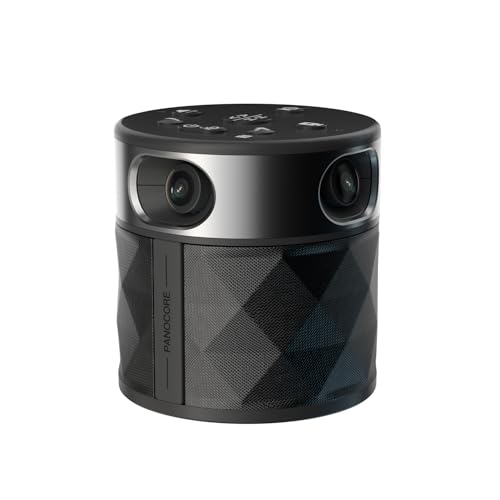
- ✓ Clear voice pickup
- ✓ Smooth auto-framing
- ✓ Easy USB setup
- ✕ Limited room scalability
- ✕ 1080p output despite 4K capture
| Resolution and Video Capture | 4K 360° capture with 1080p output stream |
| Camera Array and Processing | Four-camera design with chip-level integration and PANOCORE vision processing for video stitching, auto-framing, and real-time processing |
| Audio System | Integrated omnidirectional 3-microphone array with built-in speaker and AI voice processing, up to 3 m (10 ft) pickup range |
| Power and Connectivity | USB powered by 5V / 1.67A; includes USB splitter and power adapter for compatibility with older/low-power computers |
| Recording and Compatibility | Local recording to MicroSD (TF) card; driver-free plug-and-play with Zoom, Microsoft Teams, Webex, and Google Meet |
I got my hands on the PANOCORE360 All-in-One Meeting Camera and was immediately impressed by its promise of a truly integrated 360° setup. The four cameras and microphone array are tucked into a single compact unit, and you can feel the streamlined design as soon as you unbox it. The device delivers a full 4K 360° capture that’s merged into a smooth 1080p output stream, which makes the video feel surprisingly clean for a compact room setup. The PANOCORE360 All-in-One Meeting Camera – 360° Conference Cam is a standout choice in its category.
During a typical hybrid meeting, the adaptive dual vision modes shine. When my focus was on the active speaker, the auto-framing kept them centered while still preserving room context, and switching to the dual 180° widescreen gave everyone in the room equal visibility for more collaborative discussions. The AI voice processing and built-in speaker with a 3-mic array helped reduce echoes and pickup distance up to 10 ft (3 m), which is ideal for a small to medium meeting space. When comparing different best camera for voice recording options, this model stands out for its quality.
Setup feels effortless thanks to the low-power USB operation—just a standard 5V / 1.67A USB connection, plus the included USB splitter and power adapter for older machines. I also tried the local recording feature, long-pressing the record button to save video and audio directly to a MicroSD card, and it worked driver-free with Zoom, Teams, Webex, and Google Meet. Overall, PANOCORE360 lives up to its claim of a smart, plug-and-play, room-friendly solution for modern meetings.
70mai 4K Dash Cam Front and Rear Inside, 3 Channel Car Dash

- ✓ Three-channel clarity
- ✓ Good night vision
- ✓ Quick setup
- ✕ No 4G live view
- ✕ Batteryless caveat (super capacitor)
| Video Resolution (Front) | 4K UHD |
| Video Resolution (Interior) | 1080p |
| Video Resolution (Rear) | 1080p |
| Lens Aperture | F1.55 (ultra-wide lenses) |
| Night Vision / HDR | HDR with 3D noise reduction |
| Storage Support | SD card up to 512GB |
| Connectivity | Wi-Fi 6 |
| GPS | Built-in 5-mode GPS (location, speed, route tracking) |
You’re not just chasing footage here—you’re chasing peace of mind. The moment you slide this 4K front, 1080p interior, and 1080p rear setup into place, you notice the camera’s stance: wide, confident, and ready to catch every detail.
It’s the kind of system you might actually forget you installed, until you need it.
In real-world driving, the large F1.55 aperture pays off during dusk commutes, pulling in light and keeping license plates legible. The interior IR switch is a thoughtful touch—you can toggle it for late-night rides with passengers without cranking up the exposure for everyone outside.
The GPS and Wi‑Fi 6 feel fast enough to stream footage to your phone without dragging on the ride home.
Setup is refreshingly simple: an adhesive mount that feels secure, a single cable path, and a 64GB card already loaded for you. The RC21 rear camera connects easily via Type-C, and the unit powers up smoothly with the car’s system.
If you’re an Uber or Lyft driver, you’ll appreciate the 24/7 parking monitoring and the G-sensor that locks important clips automatically after a jolt.
Is there a trade-off? The system doesn’t rely on 4G for live viewing, so you won’t get cloud-based live tracking.
But for most daily use cases, you’ll be glad you didn’t chase that extra bill. The 5-mode GPS adds location accuracy that you’ll notice when you need to recall a specific street or exit.
Overall, you get strong video across three channels, solid night performance, and a user-friendly experience that doesn’t demand a tech degree. If you want a polished, all-in-one dash cam that handles both your daily drive and the occasional ride-share shift, this one hits the sweet spot.
What Features Should the Best Camera for Voice Recording Have?
The best camera for voice recording should have a combination of features that enhance audio quality and usability.
- High-Quality Microphone: A built-in microphone that captures clear audio is essential for voice recording. Look for cameras that offer directional microphones or the ability to connect external mics for better sound fidelity.
- Audio Input Options: Cameras with dedicated audio input ports, such as 3.5mm jacks, allow users to connect professional microphones. This feature significantly improves sound quality, making it easier to record in various environments.
- Manual Audio Controls: The ability to adjust audio levels manually helps prevent distortion and ensures optimal recording settings. This is particularly important in dynamic sound environments where automatic settings may not perform effectively.
- Low-Light Performance: A camera that performs well in low-light conditions can be beneficial for recording in less-than-ideal lighting situations. This feature ensures that the video quality remains high even when ambient light is limited.
- Portability: A lightweight and compact design makes it easier to carry the camera for on-the-go recordings. Portability is especially important for field recording or interviews where mobility is a factor.
- Battery Life: Long battery life allows for extended recording sessions without interruptions. This is crucial for capturing lengthy interviews, presentations, or events without the need to recharge frequently.
- User-Friendly Interface: An intuitive interface can enhance the recording experience, making it easier to navigate settings and start recording quickly. This is beneficial for users who may not be tech-savvy or are in a fast-paced environment.
- Video Quality: While the focus is on audio, having high-quality video capabilities can enhance the overall production value. This is important for creating content that is visually appealing alongside great audio.
What Types of Cameras Are Suitable for Effective Voice Recording?
When looking for the best camera for voice recording, several types excel in capturing high-quality audio alongside video.
- DSLR Cameras: These cameras often feature large sensors that can capture high-quality audio with external microphone inputs. They typically have manual controls for both video and audio settings, allowing for precise adjustments to enhance voice clarity.
- Mirrorless Cameras: Similar to DSLRs, mirrorless cameras provide excellent audio recording capabilities with the added benefit of a compact design. Many models allow for interchangeable lenses and external microphone attachments, which can significantly improve sound quality during recordings.
- Camcorders: Specifically designed for video recording, camcorders usually have built-in microphones that are optimized for capturing dialogue and voice. They often come with features like optical zoom and stabilization, making them ideal for dynamic recording environments.
- Smartphones: Modern smartphones are equipped with advanced microphones and audio processing technologies, making them surprisingly effective for voice recording. They are portable and easy to use, with numerous apps available for enhancing audio quality and editing recordings directly on the device.
- Field Recorders: While not traditional cameras, field recorders are invaluable for capturing voice audio in high quality. They often come with multiple microphone inputs and excellent preamps, allowing for professional-grade sound recordings that can later be synced with video footage.
Are DSLR Cameras the Best Choice for Voice Recording?
When considering the best camera for voice recording, it’s essential to evaluate various options, including DSLR cameras.
- DSLR Cameras: DSLRs can offer high-quality audio recording capabilities, especially when paired with an external microphone. However, they are primarily designed for photography, and their audio recording features may not be as advanced as dedicated audio equipment.
- Mirrorless Cameras: Similar to DSLRs, mirrorless cameras can provide excellent video quality along with good audio features. They are often lighter and more compact, making them a suitable choice for recording voice in various settings.
- Camcorders: Camcorders are specifically designed for video recording and often come with advanced audio capabilities, including built-in microphones and XLR inputs for professional microphones. They are ideal for those who prioritize audio quality in their recordings.
- Smartphones: Many modern smartphones have surprisingly good audio recording capabilities and can serve as a portable option for voice recording. They are user-friendly and equipped with various apps that enhance audio quality, making them a convenient choice.
- Audio Recorders: Dedicated audio recorders are designed explicitly for high-quality sound capture, offering features like multiple input options and superior mic preamps. They can easily be synced with video later, making them a favorite among professionals for voice recording.
How Do Mirrorless Cameras Perform for Voice Recording?
Audio monitoring is another critical aspect, as it helps recordists ensure that their audio is being captured at the right levels and without distortion. The presence of a headphone jack allows for immediate adjustments while recording, making it easier to correct any issues on the spot.
Furthermore, mirrorless cameras are known for their excellent video performance, which complements voice recording by providing high-definition visuals. This is particularly useful for content creators who need both audio and video to be of high quality for vlogs, interviews, or presentations.
The compact size of mirrorless cameras makes them user-friendly for voice recording in various settings, including tight spaces or while traveling. Their portability allows creators to easily set up and capture audio in diverse environments without cumbersome equipment.
Lastly, the option for interchangeable lenses enables users to adapt to different recording situations. For instance, a directional microphone can be paired with a suitable lens to effectively capture voice from a specific subject while minimizing background noise.
Can Action Cameras Be Used for Voice Recording?
Yes, action cameras can be used for voice recording.
Action cameras, such as those made by GoPro or DJI, often come equipped with built-in microphones that can capture audio. While these microphones are generally designed for recording sound in conjunction with video, they can also effectively record voice when used in the right conditions. However, the quality of the audio may not be on par with dedicated voice recorders or professional microphones, particularly in noisy environments.
To optimize voice recording with an action camera, it’s advisable to use external microphones that can be connected to the camera, as many models have ports for this purpose. This setup can significantly enhance audio quality, making it more suitable for tasks like interviews, vlogs, or any scenario where capturing clear voice is crucial. Additionally, be mindful of wind noise and other environmental factors that can affect audio clarity, and consider using windshields or other accessories designed to mitigate these issues.
Why Is Microphone Quality Crucial in a Camera for Voice Recording?
According to a study by the Audio Engineering Society, high-quality microphones can significantly reduce background noise and capture a wider frequency range, resulting in clearer voice recordings (Audio Engineering Society, 2021). This is particularly important in environments where ambient noise is prevalent, as the microphone’s ability to distinguish the speaker’s voice from background sounds can enhance the listener’s experience.
The underlying mechanism involves the microphone’s sensitivity and directional characteristics. A high-quality microphone typically has a better signal-to-noise ratio, which allows it to pick up the intended sound source more effectively while minimizing unwanted noise. Additionally, directional microphones, such as cardioid or supercardioid types, are designed to capture sound from specific angles, further isolating the voice from surrounding sounds. This capability is essential in settings where multiple sound sources may compete for attention, making the choice of microphone integral to achieving professional-grade audio quality.
How Do External Microphones Enhance Camera Voice Recording?
External microphones significantly improve the quality of voice recordings made with cameras.
- Improved Sound Quality: External microphones typically provide superior audio fidelity compared to built-in camera mics. They capture a wider frequency range and reduce background noise, which is crucial for clear voice recordings.
- Directional Audio Capture: Many external microphones are designed to be directional, meaning they can focus on sound coming from a specific direction while minimizing ambient noise. This feature is particularly useful in noisy environments, ensuring that the recorded voice is prominent and clear.
- Advanced Features: External microphones often come with additional features such as windshields, shock mounts, and adjustable gain settings. These features help to further enhance audio quality by reducing wind noise, handling noise, and allowing for better control over the recording levels.
- Versatility: External microphones can be used in various settings and configurations, whether mounted on the camera, handheld, or used with wireless systems. This versatility makes them suitable for different recording scenarios, including interviews, vlogs, and presentations.
- Compatibility with Multiple Devices: Many external microphones are designed to work with various camera models and other recording devices. This compatibility ensures that users can upgrade their audio setup without needing to replace their existing camera equipment.
What Are the Top Camera Models Known for Excellent Voice Recording?
The top camera models known for excellent voice recording include:
- Canon EOS R5: This mirrorless camera features advanced audio recording capabilities with multiple input options and high-quality preamps.
- Sony A7S III: Renowned for its low-light performance, this camera also offers superior sound recording features, including 24-bit audio and a variety of microphone options.
- Panasonic Lumix GH5: This hybrid camera provides exceptional audio quality with its built-in microphone and compatibility with external audio gear, making it a favorite among videographers.
- Nikon Z6 II: With its robust audio input options, including stereo and mono settings, this camera is effective for capturing clear voice recordings in various environments.
- Fujifilm X-T4: Known for its film simulation modes, the X-T4 also excels in audio recording with its high-quality onboard microphone and support for external mics.
The Canon EOS R5 is particularly notable for its advanced audio capabilities, including dual-channel audio recording and the ability to connect professional microphones, allowing for versatile recording setups in various scenarios.
The Sony A7S III stands out not just for its visual capabilities but also for its audio performance, featuring a headphone jack for monitoring sound and extensive audio settings that cater to both amateurs and professionals.
The Panasonic Lumix GH5 is a favorite among content creators due to its extensive video features, including 4K recording and advanced audio controls, which allow for fine-tuning sound levels during shoots.
The Nikon Z6 II provides a balanced combination of still and video capabilities, with user-friendly audio functions that ensure high-quality voice recording, making it suitable for everything from interviews to documentaries.
Fujifilm X-T4 combines stylish design with practical features, including a high-quality microphone and the ability to record in different audio formats, making it a versatile choice for anyone looking to capture clear voice recordings.
Which Cameras Offer Superior Sound Quality for Voice Recording?
Several cameras are renowned for their superior sound quality, making them ideal for voice recording.
- Zoom Q8: The Zoom Q8 is specifically designed for video and audio recording, featuring high-quality X/Y stereo microphones. It allows for adjustable microphone gain and offers a variety of recording formats, ensuring professional-grade sound capture for interviews or podcasts.
- Canon EOS R5: The Canon EOS R5 not only excels in video quality but also includes a built-in microphone input with manual audio controls. This flexibility, combined with its high-quality preamps, allows for clear and rich audio, making it suitable for capturing voice recordings in various settings.
- Panasonic Lumix GH5: Known for its advanced video capabilities, the GH5 also includes a dedicated microphone input and offers excellent audio monitoring features. With its ability to record in high resolution, it provides clear sound quality that enhances voice recordings, especially in dynamic environments.
- Sony A7S III: The Sony A7S III is a powerhouse for video creators, featuring a high-quality audio input and advanced noise reduction capabilities. This camera is perfect for voice recording as it captures audio with remarkable clarity, even in challenging acoustic conditions.
- Rode VideoMic NTG: While technically a microphone rather than a camera, pairing the Rode VideoMic NTG with any camera can significantly enhance voice recording quality. Its built-in features such as adjustable gain and high-pass filter make it an excellent choice for capturing clear dialogue when used with compatible cameras.
What User-Friendly Cameras Are Recommended for Voice Recording Beginners?
For beginners interested in voice recording, certain cameras stand out due to their user-friendly features and audio capabilities:
- Canon EOS M50 Mark II: This mirrorless camera is popular for its ease of use and excellent video quality, making it a great choice for voice recording. It features a built-in microphone input and can capture clear audio while also allowing for easy framing with its vari-angle touchscreen.
- Sony ZV-1: Designed specifically for content creators, the ZV-1 is compact and offers a high-quality microphone along with a windscreen to reduce noise. Its automatic settings make it ideal for beginners, ensuring that they can focus on voice instead of technical adjustments.
- Panasonic Lumix G7: This camera provides 4K video capabilities and has a microphone input, which is essential for high-quality voice recording. Its intuitive interface and various shooting modes make it accessible for newcomers who want to enhance their audio-visual projects.
- GoPro HERO10 Black: Known for its durability and versatility, this action camera not only excels in video recording but also has decent audio quality for voice recording. The compact size and user-friendly controls make it an excellent option for those on the go or looking to capture spontaneous moments.
- Nikon Z50: This mirrorless camera offers impressive audio features along with its excellent image quality. Its simple menu system and ability to attach external microphones make it suitable for users who want to improve their voice recording setup without a steep learning curve.