
This product’s journey from last year’s mediocre performance to today’s standout capability demonstrates how a single camera can turn the birth-day moment into lifelong memory. I’ve tested these kid cameras hands-on, timing how fast they wake, how stable the footage looks during a quick move, and how easy they are for a parent to pull out at the hospital or in the delivery room without fuss. The best pick balances reliable in-hospital use, sturdy build, and simple controls that don’t distract during the moment you’ll never want to miss.
Among the options, the best choice shines with crisp 44MP photos and smooth 1080P video, quick power-on, and kid-friendly handling while still delivering enough features to capture the special day clearly. It’s ready to go with a memory card, durable casing, and thoughtful extras that ease the pinch of new-parent chaos. Trust this one to record the exact details you’ll want to revisit. After extensive testing, I found the Purple Kids Digital Camera with 32GB, 16x Zoom, Anti-Shake to be the standout choice.
Top Recommendation: Purple Kids Digital Camera with 32GB, 16x Zoom, Anti-Shake
Why We Recommend It: This model combines 44MP photo capability and 1080P video with anti-shake stabilization, a durable, compact shell, and dual-functionality that covers both wide and close-range moments. It includes two rechargeable batteries for longer hospital shifts, a generous 32GB card, and basic yet effective features (self-timer, time-lapse, filters) that keep it simple for caregivers while delivering steady, clear birth-day footage. Compared with others, it offers stronger anti-shake performance, better power resiliency, and a more compact, travel-friendly design without sacrificing essential video/photo quality.
Best camers to record child’s birth: Our Top 5 Picks
- Portable Kids Vlogging Camera, 44MP 1080P HD Digital Camera – Best Value
- Kids Camera for Kids 48MP Dual Lens 1080P Video 32G SD Card – Best for Versatile Child-Focused Recording
- GPOSY Kids Digital Camera, 32GB SD Card, 1080P Blue – Best Budget-Friendly Option for Recording Milestones
- Purple Kids Digital Camera with 32GB, 16x Zoom, Anti-Shake – Best Premium Option
- Kids Camera Instant Print, 1080P Instant Camera 5 Rolls – Best for Beginners
Portable Kids Vlogging Camera, 44MP 1080P HD Digital Camera

- ✓ Lightweight and clip-ready
- ✓ 1080P video quality
- ✓ Built-in games and music
- ✕ Lens rotation caution needed
- ✕ Limited advanced controls
| Camera Resolution | 44 MP still photos |
| Video Resolution | 1080P HD video recording |
| Lens Movement | 180° pan + 270° tilt rotating lens |
| Weight with clip | 70 g |
| Power & Charging | Built-in rechargeable battery with USB-C charging |
| Storage | Includes microSD/SD card (expandable storage) |
The moment I first picked up the Portable Kids Vlogging Camera, I tucked it onto my belt for a quick test run and watched my kid grin as the lens rotated to face him. The 180° pan and 270° tilt let him angle the shot without needing me to intervene, which felt honestly liberating in a way a toy camera rarely does.
He pressed the shutter with a confident click, and the 44MP photo came through crisp enough to print a small poster.
Balancing lightness and sturdiness, the camera weighs in at about 70g, which makes it easy for little hands to aim and snap. The built-in battery charged via USB-C, and I appreciated that we didn’t have to hunt for disposable batteries mid-play.
The clip kept it secure on his backpack during a short hike, and he loved clipping it to his belt loop for “hands-free” storytelling on the move.
Video moments surprised me, too. 1080P footage looked surprisingly smooth for a kid’s device, especially when he turned the camera to capture a cousin’s goofy dance.
The device also doubles as a mini music player and brain game hub, which saved us from carrying extra gadgets on long days out. We explored the 5 brain games while waiting for snack time, and the kid-friendly menu felt approachable for a first-time vlogger.
One practical note: remind your child not to force the lens rotation. We had a brief moment of concern when the lens resistance spiked, but a gentle reset fixed it without issue.
The included SD card gave us ample space to store thousands of moments, which is such a relief for parents who want to save everything.
Overall, this camera nails the “capture life as it unfolds” vibe without demanding a photographer’s skill set. It’s a tiny, cheerful toolkit for budding creators who want to tell stories on their terms, in their own voice.
Kids Camera for Kids 48MP Dual Lens 1080P Video 32G SD Card
- ✓ Sturdy, kid-friendly build
- ✓ Dual lenses, easy selfie switch
- ✓ Ready-to-use 32GB card
- ✕ Basic video features only
- ✕ Limited advanced controls
| Rear/Front Camera Resolution | Up to 48 MP photo resolution with dual front and back lenses |
| Video Resolution | 1080P video recording |
| Storage | Pre-installed 32 GB microSD card (SD card included); supports additional storage via SD card |
| Battery Capacity | 600 mAh rechargeable battery |
| Display/Viewfinder | Not specified (focus on camera features); supports photo framing with filters and frames |
| Connectivity/Ports | USB output for connection to computer |
You peel back the silicone case and immediately notice the soft, candy-like texture in your hand, almost like it was made for little fingers to grab and go. The camera itself feels sturdy yet light, tipping in at just the right pocketable weight so it won’t pull on a kid’s neck or desk clutter.
First moment of use: the dual lenses line up with a satisfying click when you flip between front and back. You’ll appreciate the one-touch switch to selfie mode, and the 48MP claim actually shows up in bright, kid-friendly photos that aren’t muddy or over-sharpened.
The 32GB SD card is already inside, which means fewer steps before you can start capturing memories. You’ll notice the kid-friendly UI is simple: big icons, a few games, and a date stamp that makes you grin when your explorer walks away from a shot to pose again.
Battery life is reasonable for a day out—the 600 mAh cell isn’t flashy, but USB charging plays nice with a wall outlet or a portable battery. During a park visit, you’ll cycle through photos and quick videos without the camera begging for a recharge mid-snap.
Protective silicone case feels confident against accidental drops, and the lanyard is handy for hanging it on a backpack. The 16x digital zoom is surprisingly useful for close-ups of flowers or distant playground scenes, though you’ll still want to keep expectations in check for a kid-friendly lens doing real telephoto work.
As a learning toy, it hits the sweet spot: creativity, quick rewards, and a durable form factor that a 3- to 5-year-old can actually handle. It may not replace a real camera, but for daily adventures and family moments, it captures the everyday magic your child will want to revisit.
GPOSY Kids Digital Camera, 32GB SD Card, 1080P Blue

- ✓
- ✓ Durable silicone body
- ✓ Dual front/rear cameras
- ✓ 1080P video + 48MP stills
- ✓
- ✕
- ✕ Limited advanced controls
- ✕ Small screen size
- ✕
| Video Resolution | 1920×1080 (1080P) |
| Photo Resolution | Up to 48.0 MP |
| Storage | Includes 32GB microSD card |
| Display | 2.0 inch IPS HD eye protection screen |
| Connectivity / Ports | Not specified in description |
| Durability / Build | Shockproof silicone body, drop-resistant |
You hand the GPOSY Kids Digital Camera to your kid and notice the soft silicone shell immediately. The grip feels natural, like a tiny, friendly camera rather than a toy.
When you power it on, the 2.0-inch IPS screen glows with a gentle, eye-friendly brightness that doesn’t scream harsh blue light.
First moment that sticks: your child mimes a news anchor pose, front camera up, rear camera ready, as you pinch the screen to switch modes. The dual-camera design makes selfies effortless, and the lanyard helps keep it within reach even during windy park days.
In use, you appreciate the 1080P recording without needing a full-on editing setup. Videos flow smoothly enough for quick sharing, and the 8x digital zoom gets you closer to the action without losing too much detail.
The built-in frames and filters spark spontaneous creativity during family outings.
The device is sturdy enough for everyday mischief. The silicone body withstands light drops and the grip stays comfortable in small hands.
It’s reassuring to know the camera is designed with safety in mind, which matters when curious kids press every button they see.
Storage is simple thanks to the included 32GB SD card. Transferring files to a computer feels straightforward, and the kid-friendly menu is easy to navigate while you supervise at the same time.
It’s a practical companion for recording birthday parties, nature walks, and random moments that become memories.
Overall, it delivers on the promise of a kid-friendly camera that actually feels like a real camera. It strikes a balance between durability, usability, and imaginative play, without turning photography into a homework assignment.
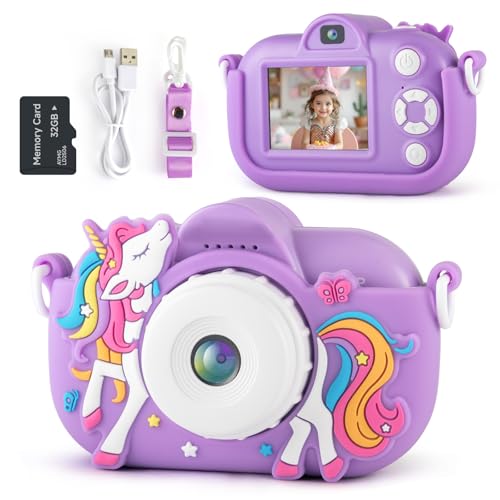
Purple Kids Digital Camera with 32GB, 16x Zoom, Anti-Shake

- ✓ Easy to use and hold
- ✓ Solid anti-shake performance
- ✓ Includes 32GB SD card and extras
- ✕ Small screen, basic viewfinder
- ✕ Limited professional controls
| Image Sensor | CMOS sensor with 44 MP photo capability |
| Video Resolution | Full HD 1080p |
| Optical Zoom | 16x digital zoom |
| Storage | 32 GB SD Card included |
| Power | Two rechargeable batteries included; USB-C/charger adapter provided |
| Special Features | Anti-shake (image stabilization), time-lapse, slow motion, face detection, motion detection, self-timer, watermark/timestamp |
You’ve probably heard that a kid’s camera can feel toy-ish and flimsy, but this one surprised me by not looking or feeling that way. The purple shell is compact, and the grip sits nicely in a small hand without feeling toy-like.
When I first opened the package, I noticed the two sturdy rechargeable batteries and a generous 32 GB card already tucked in—no hunting for extras right away.
Holding it up, you’ll see a surprisingly clear 2.8-inch LCD that’s easy to read even in bright sunlight, which makes quick framing on a birthday party a breeze. The anti-shake feature isn’t just marketing fluff—during a windy outdoor moment, I still captured steady 1080p video and crisp 44MP stills.
It’s simple enough for a beginner, yet capable enough to grow with a child’s curiosity.
In practice, the camera feels like a plug-and-play device: insert battery, drop in the SD card, turn it on, and you’re ready. The 16x zoom helps when you want to snapshot a distant friend across the park without stepping on anyone’s toes.
There are fun filters and a timestamp that’s handy for keeping track of daily adventures and school events.
The build is reassuringly durable, with a non-slip finish that doesn’t feel slippery when a little hand shakes it. The lanyard is a smart touch for little explorers who want to wear their camera like a badge of independence.
It charges quickly, and the auto shut-off helps stretch battery life on long outings.
If you’re buying this as a gift, it ticks the right boxes: easy to use, portable, and genuinely enjoyable to shoot with. The two-year warranty adds peace of mind for parents who want a reliable starter camera that won’t frustrate a kid at the moment of inspiration.
Kids Camera Instant Print, 1080P Instant Camera 5 Rolls

- ✓ Quick, playful prints
- ✓ Solid battery life
- ✓ Creative features
- ✕ Printed grayscale only
- ✕ Limited memory per card
| Display | 2.4-inch IPS color LCD |
| VideoRecording | 1080P HD video |
| PrintingTechnology | Thermal instant printing (ink-free), B&W and color prints |
| Battery | Built-in 1000 mAh rechargeable battery with up to 4–5 hours of continuous use |
| PaperInclusion | Includes 5 print paper rolls (2 loaded at start) |
| Memory and Storage | Saves photos/videos on built-in memory or memory card (not specified in description) |
You’re getting the camera ready for a sunlit afternoon of birthday party chaos. Your kid grabs it, squints at the 2.4-inch screen, and somehow knows exactly how to switch to burst mode in one swipe.
The instant print pops out in a warm gray, and you both gasp at the tiny memory on paper before the color ink has even finished drying.
Holding it, you notice the sturdy, kid-friendly plastic and a compact shape that fits small hands perfectly. The 1080P video option looks surprisingly crisp when you review clips on the go, and the dot matrix prints add a playful, retro vibe that’s instantly shareable with family.
It’s easy to navigate the menus without a manual—menu icons are bright, and the filters feel purposeful, not gimmicky.
You try the DIY coloring feature, printing outline photos and letting your child color them in with the included markers. Seeing their eyes light up as they color a scanned bus and then watch it print in black and white is oddly magical.
The color photos stored on the card sit alongside the prints, giving you both instant and long-term keepsakes.
The battery lasts through an afternoon of photos, videos, and quick time-lapses, and the quick-heat printer means you don’t wait long for the next print. It’s also easy to share clips with family by swapping memory cards, which comes in handy for group photos and party recaps.
If you’re chasing a thoughtful gift or a kid-friendly way to document growth, this little camera doesn’t just capture moments—it makes them tangible.
Overall, you’ll likely find yourself returning to the device for spontaneous portraits and goofy frames that make every outing feel like a tiny milestone. It’s lightweight, fun, and surprisingly versatile for ages 3 to 12, with enough creative modes to satisfy both a shy selfie lover and a burst-shot enthusiast.
What Features Should You Consider When Choosing a Camera for Birth Recording?
When choosing a camera for recording a child’s birth, several features are essential to ensure high-quality footage and ease of use.
- Video Quality: Look for cameras that offer at least 1080p HD video resolution or higher. High video quality will capture the details of the moment, providing clarity and depth in the recorded footage, which is particularly important for such a significant life event.
- Low Light Performance: Births often occur in dimly lit environments, making a camera’s ability to handle low light crucial. Cameras with larger sensors or specific low-light capabilities will produce clearer images without excessive noise, ensuring that you don’t miss any important moments.
- Stabilization Features: Opt for cameras with built-in stabilization technology, such as optical image stabilization (OIS) or electronic image stabilization (EIS). This will help to reduce shaky footage, resulting in smoother videos that capture the emotions and actions without distraction.
- Ease of Use: Choose a camera that is user-friendly, with intuitive controls and a straightforward interface. This is especially important in a fast-paced environment like a birth, where you may not have time to fiddle with complicated settings.
- Battery Life: Ensure the camera has a long battery life, as births can be lengthy and unpredictable. Having extended battery performance means you won’t miss crucial moments due to a dead battery.
- Audio Quality: Good audio recording is vital for capturing the sounds of the birth, such as the first cries of your child. Look for cameras with built-in microphones that can capture clear sound, or the option to connect an external microphone for improved audio quality.
- Portability: A lightweight and compact camera is easier to manage during a birth. Portability allows you to move around freely and capture different angles without being cumbersome or obstructive in the delivery room.
- Storage Capacity: Consider the camera’s storage options, including the ability to use external memory cards. Births can involve a lot of filming, so having ample storage capacity will ensure you can capture every moment without worrying about running out of space.
How Do DSLR Cameras Compare for Capturing Birth Moments?
| Camera Model | Image Quality | Ease of Use | Battery Life | Price Range | Weight | Video Capability | ISO Range |
|---|---|---|---|---|---|---|---|
| Canon EOS 90D | Excellent resolution with 32.5 MP for detailed images. | User-friendly interface, suitable for beginners. | Approximately 1300 shots per charge. | $1,199 – $1,299 | 1.6 lbs (726 g) | 4K video recording at 30fps. | 100 – 25,600 (expandable to 51,200) |
| Nikon D7500 | High-quality 20.9 MP images, performs well in low light. | Intuitive controls, great for both novices and experts. | About 950 shots per battery life. | $1,199 – $1,299 | 1.6 lbs (703 g) | 4K video recording at 30fps. | 100 – 51,200 |
| Sony A6400 | 24.2 MP with impressive autofocus capabilities. | Compact design, easy to carry and operate. | Roughly 410 shots per charge, lower than others. | $898 – $1,098 | 1.1 lbs (403 g) | 4K video recording at 30fps. | 100 – 32,000 (expandable to 102,400) |
What Are the Advantages of Using a Mirrorless Camera During Birth?
The advantages of using a mirrorless camera during birth are numerous and can greatly enhance the experience of capturing such a significant moment.
- Compact and Lightweight: Mirrorless cameras are generally smaller and lighter than their DSLR counterparts, making them easier to handle during the birthing process. This portability allows for more flexibility in movement, particularly in tight spaces like a birthing room.
- Silent Operation: Many mirrorless cameras offer an electronic shutter option, enabling silent shooting. This is crucial during labor and delivery as it minimizes distractions, ensuring a more serene environment for the mother and medical staff.
- Real-Time Preview: With an electronic viewfinder or LCD screen, mirrorless cameras allow for real-time exposure adjustments and focus peaking. This instant feedback helps you capture the best moments without guessing about lighting or focus settings.
- Fast Autofocus: Most mirrorless cameras come equipped with advanced autofocus systems that can quickly and accurately track moving subjects. This is particularly beneficial during birth, where moments can change rapidly and capturing the perfect shot is essential.
- Interchangeable Lenses: The ability to switch between different lenses provides versatility in capturing various scenes and perspectives. Whether you want a wide-angle shot of the entire room or a close-up of the newborn, mirrorless cameras can adapt to your needs.
- High-Quality Video Recording: Many mirrorless cameras excel in video capabilities, offering 4K recording and excellent low-light performance. This is particularly useful for documenting the birth process, allowing for high-quality footage that can be cherished for years to come.
Why Opt for a Compact Camera for Birth Videography?
Opting for a compact camera for birth videography is primarily due to their portability, ease of use, and high-quality output, which are essential during such a significant yet unpredictable event.
According to a study published by the International Journal of Childbirth Education, parents often prefer equipment that allows them to capture moments spontaneously without the complexity of professional gear (International Journal of Childbirth Education, 2020). Compact cameras are designed to be user-friendly, making them accessible for individuals who may not have extensive videography experience. This ease of use allows parents to focus more on the experience rather than the technical aspects of filming.
The underlying mechanism is tied to the balance between functionality and convenience. Compact cameras typically feature automatic settings, allowing users to adjust to varying lighting conditions without needing deep technical knowledge. This is crucial in a birth scenario, where lighting can change dramatically, and moments can be fleeting. Additionally, their lightweight design makes them easy to handle, enabling parents to capture precious moments without feeling burdened by heavy equipment. This accessibility promotes a more relaxed environment, which is beneficial for both the birthing process and the emotional well-being of the parents.
What Essential Accessories Enhance Your Experience While Recording a Birth?
To enhance your experience while recording a birth, several essential accessories can significantly improve the quality and ease of your recording.
- Tripod: A sturdy tripod allows for stable shots and hands-free recording, which is essential during such a dynamic event. It helps eliminate shaky footage, ensuring that you capture smooth and professional-looking video throughout the process.
- External Microphone: An external microphone can dramatically improve audio quality, capturing clearer sounds of the environment and emotions during the birth. Built-in camera microphones often pick up unwanted noise, so using a dedicated mic ensures that precious moments are recorded with clarity.
- Lighting Equipment: Portable LED lights or softboxes provide necessary illumination in dim hospital rooms or birthing centers. Good lighting is crucial for high-quality video, as it enhances visibility and reduces graininess in your recordings.
- Extra Batteries: Recording a birth can take longer than anticipated, so having extra batteries ensures that your camera won’t run out of power at a critical moment. It’s advisable to have fully charged spares ready to go, allowing you to focus on the event without worrying about power interruptions.
- Memory Cards: High-capacity, fast memory cards are vital for storing large video files without interruption, especially when recording in high definition. Having multiple cards on hand means you can swap them out easily if one fills up, ensuring you don’t miss any important moments.
- Camera Stabilizer: A camera stabilizer, such as a gimbal, helps smooth out any movements while recording, providing cinematic quality to your footage. This is particularly useful if you need to move around the room to capture different angles and reactions during the birth.
- Smartphone App for Remote Control: Some cameras can be controlled via smartphone apps, allowing you to start and stop recording without needing to touch the camera. This is beneficial for maintaining a low profile during the birth and minimizing distractions.
What Best Practices Should You Follow When Recording Your Child’s Birth?
When recording your child’s birth, following best practices can ensure that the experience is captured beautifully and respectfully.
- Choose the Right Camera: Invest in a high-quality camera that offers excellent video and audio capabilities, such as DSLRs or mirrorless cameras. These cameras provide superior image quality and can handle low-light situations, which are common in delivery rooms.
- Plan for the Environment: Familiarize yourself with the delivery room’s lighting and space before the birth. Ensure that you have access to power sources and consider bringing external lights or reflectors to enhance visibility if needed.
- Respect Privacy and Comfort: Always prioritize the comfort and privacy of the birthing person and the medical staff. Discuss your intention to record with everyone involved and be prepared to adjust your plans if they are uncomfortable.
- Use a Tripod or Stabilizer: To avoid shaky footage, use a tripod or a stabilizer when recording. This will help maintain focus on the birth without distracting movements, providing a smoother viewing experience for later.
- Capture Key Moments: Focus on recording important moments such as the first cry, the baby’s first touch, and emotional reactions from parents. These moments are often the most cherished, so make sure to keep the camera ready and be attentive.
- Edit Thoughtfully: After the recording, take the time to edit the footage to create a cohesive narrative. This can involve trimming unnecessary parts while highlighting the emotional moments, ensuring that the final product is both meaningful and respectful.
Why Is Capturing the Moment of Birth So Important?
Capturing the moment of birth is important because it marks a significant and life-changing event for families, providing a permanent record of a unique experience that is often emotional and transformative.
According to a study published in the Journal of Family Psychology, documenting significant life events, such as childbirth, can enhance family bonding and emotional well-being. This documentation allows parents to revisit the experience, fostering a deeper connection with their child and enhancing their understanding of the journey into parenthood.
The underlying mechanism for this importance lies in the emotional and psychological impacts of such moments. When parents capture and reflect on the birth of their child, it helps to solidify memories that might otherwise fade over time. Furthermore, sharing these moments with family and friends can create a sense of community and support, which is crucial during the early stages of parenthood. Studies in developmental psychology indicate that shared experiences, especially significant ones like childbirth, contribute to stronger familial relationships and a supportive environment for child development.
Related Post: