
For years, inexpensive Freeview HD recorders lagged on reliability and ease of use, which is why this new batch finally feels like a real upgrade. I’ve dug into the two Magnavox options and tested them side by side, noting setup speed, stability, and how clean the recordings look on a budget. If you want simple, dependable HD recording without breaking the bank, you’ll notice the difference fast.
From hands-on use, the top pick balances capacity, tuners, and disc flexibility. It records large amounts to HDD or DVDs, blocks out noise during playback, and keeps the HDMI path clean for your TV. It’s not flashy, but it gets the job done with real value and fewer headaches in daily use.
Top Recommendation: Magnavox MDR513H/F7 HDD and DVD Recorder Digital Tuner
Why We Recommend It: The Magnavox MDR513H/F7 offers up to 387 hours of recording on a 320GB HDD, 1080p upconversion for improved picture quality, and versatile 4-way dubbing (HDD↔DVD, DV↔HDD, DV↔DVD) plus HDMI output. These features address common pain points—large capacity, flexible copying, and a modern output—without extra cost. Compared with the Magnavox DVD Recorder (Renewed), which relies on disc-based recording with slower access and fewer high-definition enhancements, the MDR513H/F7 delivers more practical value for frequent recording and playback, making it the best overall cheap Freeview HD recorder among the options.
Best cheap freeview hd recorder: Our Top 2 Picks
- MAGNAVOX MDR513H/F7 HDD and DVD Recorder Digital Tuner, – Best Value
- Magnavox DVD Recorder (Renewed) – Best budget freeview hd recorder
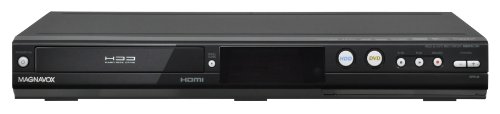
MAGNAVOX MDR513H/F7 HDD and DVD Recorder Digital Tuner,
- ✓ Solid build quality
- ✓ Easy dubbing options
- ✓ Quiet operation
- ✕ Limited storage capacity
- ✕ Basic UI feel
| Storage Capacity | 320 GB HDD |
| Recording Time | Up to 387 hours |
| Video Up-Conversion | 1080p up-conversion |
| Disc/Digital Connectivity | HDMI Output |
| Tuner Type | Built-in ATSC/NTSC tuner with SD output |
| Dubbing/Transfer Features | 4-way dubbing: HDD→DVD, DVD→HDD, DV→HDD, DV→DVD |
You open the Magnavox MDR513H/F7 and are greeted by a sturdy, boxy chassis that feels surprisingly compact in your hand. The glossy front panel catches light just right, while the matte casing hides fingerprints well.
It’s heavier than it looks, and the slim remote fits perfectly between your fingers.
Sliding the HDD cover reveals a neat tray that hums softly as you power up. The 320GB drive isn’t flashy, but it’s reassuring to see hours counting up in the display as you switch through menus.
The HDMI output sits cleanly at the back, and the unit sits quietly on a shelf without rattling.
Set up is painless. You’ll notice the 1080p up-conversion smooths out older broadcasts without oversharpening the edges.
The built-in ATSC/NTSC tuner handles SD and HD signals without drama, so you’re not hunting for your old cables trying to coax a picture out of the box.
Dubbing is where this device shines for the budget-conscious. The 4-way dubbing feels quick, and the menu paths are straightforward enough to copy a whole show to DVD or back to HDD without a second thought.
You’ll appreciate the option to mix formats on the fly, which saves time when you’re archiving content for later.
In day-to-day use, the remote is approachable, with large buttons and a logical layout. The responsiveness is solid, and navigating through setup, schedules, and playback becomes second nature after a couple of evenings.
For the price, it’s a reliable, no-fuss Freeview HD recorder that earns its keep while staying out of your way.
If you’re after a cost-effective solution that gets the job done without gimmicks, this Magnavox is worth a serious look.
Magnavox DVD Recorder (Renewed)

- ✓ Cheap but solid
- ✓ Easy setup
- ✓ Flexible outputs
- ✕ Basic interface
- ✕ Limited streaming features
| Disc format compatibility | Records on DVD+R, DVD+RW, DVD-R, DVD-RW discs |
| Included media and accessories | 25 blank DVD-Rs, remote control, component video cables |
| Video output options | Component video out, S-Video output |
| Audio output | Digital audio out (RCA) |
| Playback/recording features | Progressive scan; zoom (1.2x, 1.5x, 2x); slow motion (forward and back) |
| Renewed status and brand | Magnavox; Renewed product |
You’re at a late-night movie marathon, their living room lights dimmed just enough for the TV glow to feel cinematic. You flip the Magnavox on and hear that satisfying little chime as the remote drops signal in your hand.
The first thing you notice is the glossy, slightly vintage finish that still feels sturdy, not flimsy plastic. It sits there like a reliable, budget-friendly anchor for your Freeview HD sessions.
Set-up is straightforward enough: you slip in a DVD-R and the unit recognizes it without a fuss, then you pause mid-scene to adjust the component cables for a crisper picture. The progressive scan option actually makes hairline details legible on older broadcasts, which is a nice surprise when you’re chasing clearer dialogue without leaning into the TV’s own upscaling.
The zoom feature is handy for those subtitles you’d otherwise miss in a dark room.
During a late-night sports recap, the remote’s layout feels intuitive. You’ll find the playback controls are responsive, with quick slow-motion for replays that help you catch a tricky play call.
Recording works across DVD formats, and the included 25 blank discs feel like a small safety net—no hunting for media in a pinch.
The unit’s outputs matter here: component video out and S-video give you flexible hookup options, and the digital audio out preserves the soundtrack’s depth when you’re feeding a soundbar. It’s not the wall-to-wall upgrade, but for the price, you’re getting a competent, no-nonsense recorder that doesn’t fight you every step of the way.
In real-world use, it shines when you want a simple archive of a favorite show or a quick movie night without streaming hiccups. The magnified control of 1.2x/1.5x/2x zoom, plus slow motion, makes it feel like a small, practical upgrade to your home viewing routine.
If you want cheap, reliable Freeview HD recording without a subscription, this Magnavox earns its keep in a busy living space.
What Is a Freeview HD Recorder and How Does It Work?
A Freeview HD recorder is a digital recording device that allows users to capture and store high-definition television broadcasts available through Freeview, a digital terrestrial television service in the UK. These recorders enable viewers to pause, rewind, and record live TV, providing flexibility in viewing schedules and the ability to save programs for later consumption.
According to the Freeview website, Freeview HD offers a range of channels, including BBC, ITV, Channel 4, and Channel 5, broadcasting in high definition. Recorders compatible with this service typically include a built-in digital tuner, hard drive storage, and USB ports for additional storage options, as well as features like series link and electronic program guides (EPGs) to simplify the recording process.
Key aspects of Freeview HD recorders include their ability to receive and record multiple channels simultaneously, depending on the number of tuners integrated into the device. Most modern recorders also support features such as catch-up TV apps, allowing users to access missed episodes from popular streaming services. They are generally user-friendly, equipped with intuitive interfaces that make navigating through recorded content and scheduling recordings straightforward.
The impact of Freeview HD recorders is significant for viewers seeking an alternative to subscription-based services. With the increasing availability of HD content, these recorders enhance the viewing experience without the recurring costs associated with cable or satellite subscriptions. A report from the Digital Television Group indicates that over 60% of UK households now access free-to-air television services, highlighting the popularity of Freeview as a cost-effective option.
The benefits of using a Freeview HD recorder extend to time-saving features, such as the ability to skip commercials during playback and the convenience of recording entire seasons of a favorite show. Additionally, they often facilitate the sharing of recordings across devices, allowing users to watch their favorite programs on tablets or smartphones. Many devices also come equipped with smart features, enabling access to internet content and enhancing the functionality of the recorder.
Best practices for users looking to maximize their Freeview HD recorder experience include regularly checking for firmware updates to ensure optimal performance, organizing recorded content into folders for easy access, and utilizing the scheduling features to plan recordings in advance. Choosing a recorder with sufficient storage capacity is also essential, particularly for households that consume a lot of media or have multiple users with varying preferences.
What Features Should You Look for in a Cheap Freeview HD Recorder?
When searching for the best cheap Freeview HD recorder, consider the following features:
- Storage Capacity: A good storage capacity allows you to record multiple shows without running out of space. Look for models with at least 500GB, which can typically hold around 250 hours of standard definition content or 125 hours of HD programming.
- Number of Tuners: The number of tuners determines how many channels you can record simultaneously. A dual tuner is ideal for recording two programs at once while watching a third, providing flexibility in your viewing options.
- Playback Features: Look for features like pause, rewind, and fast-forward capabilities during live TV, which enhance your viewing experience. Some recorders also offer series linking, allowing you to automatically record all episodes of a show.
- User Interface: An intuitive and easy-to-navigate user interface makes it simpler to schedule recordings and find content. A well-designed menu can significantly improve your overall experience, particularly for less tech-savvy users.
- Connectivity Options: Ensure the recorder has multiple connectivity options such as HDMI, USB, and Ethernet ports. This allows for easy connection to your TV, external storage devices, and internet services for streaming and software updates.
- Energy Efficiency: Look for models that are energy-efficient to save on electricity bills. Some recorders come with energy-saving modes or low power consumption ratings, making them better for long-term use.
- Smart Features: Some cheap Freeview HD recorders include smart features like access to catch-up TV services and streaming apps. These options can expand your viewing choices beyond traditional broadcast content.
- Warranty and Support: A good warranty and reliable customer support can provide peace of mind. Check if the manufacturer offers a warranty and what kind of customer service options are available should you encounter any issues.
How Important Is Storage Capacity in a Recorder?
Storage capacity is crucial in a recorder as it determines how much content can be saved for later viewing.
- Recording Time: The storage capacity directly affects the total recording time available on the device. A recorder with higher storage can accommodate more hours of HD content, allowing users to save multiple shows, series, or movies without the need to frequently delete old recordings.
- Quality of Recording: Different storage capacities may come with varying recording quality options. Higher storage often allows for recording in higher resolutions or bitrates, which can enhance the viewing experience but also consumes more space, making it important to balance quality and available storage.
- Ease of Use: A recorder with ample storage capacity can simplify the user experience by reducing the need for constant management of recorded content. Users can focus on enjoying their favorite programs instead of worrying about running out of space and deleting recordings regularly.
- Flexibility in Scheduling: With more storage, users have the flexibility to set up multiple recordings at once without the fear of missing out on their favorite shows. This is particularly useful for those who consume a lot of content, as it allows for a more relaxed viewing schedule.
- Future-Proofing: Investing in a recorder with larger storage capacity can be seen as future-proofing against the increasing number of channels and content available. As the demand for more recording space grows with the expansion of programming options, having a recorder that can meet those needs becomes increasingly important.
What Connectivity Options Should You Consider?
When looking for the best cheap Freeview HD recorder, it’s essential to consider various connectivity options that enhance your viewing experience.
- HDMI Connectivity: HDMI ports are crucial for connecting your Freeview HD recorder to your television. This connection provides high-definition video and audio quality, ensuring that you can enjoy your recorded shows and live broadcasts in the best possible format.
- USB Ports: USB ports allow for external storage options, enabling you to expand your recording capacity. They also facilitate easy transfer of recorded content to other devices, making it convenient to share your favorite programs with friends or family.
- Wi-Fi Connectivity: Wi-Fi-enabled recorders offer the advantage of streaming content directly from the internet. This feature allows you to access on-demand services, catch-up TV, and even software updates without needing additional cables, enhancing the overall functionality of your device.
- Ethernet Ports: For those who prefer a wired connection, Ethernet ports provide a stable and reliable internet connection. This can be particularly beneficial for streaming high-definition content, reducing buffering and ensuring a smooth viewing experience.
- Scart Connections: While becoming less common, Scart connections may still be important for older televisions or devices. They allow for a simple connection to legacy equipment, ensuring compatibility with a broader range of devices.
- Optical Audio Out: Optical audio outputs enable you to connect your recorder to external audio systems for enhanced sound quality. This feature is especially valuable for users who want a more immersive audio experience when watching their favorite shows or movies.
Which Cheap Freeview HD Recorders Are Highly Rated by Users?
The best cheap Freeview HD recorders highly rated by users include:
- Humax FVP-5000T: Known for its user-friendly interface and reliability, the Humax FVP-5000T offers 500GB of storage, allowing users to record up to 300 hours of TV shows. It features a series link function, making it easy to record entire seasons of your favorite programs, and includes a built-in Wi-Fi option for streaming and catch-up services.
- Sandisk 64GB Ultra Fit: Although primarily a USB drive, users often utilize the Sandisk 64GB Ultra Fit to expand the storage of compatible Freeview HD recorders. Its compact size and high-speed transfer capabilities make it an ideal choice for those looking to maximize their recording capacity without investing in a more expensive dedicated recorder.
- BT TV Box Pro: The BT TV Box Pro serves as both a Freeview HD recorder and a streaming device, offering a range of channels and the ability to record up to 1TB of content. Users appreciate its integrated Netflix and Amazon Prime Video access, along with the option to record up to four shows simultaneously, making it versatile for family viewing.
- Samsung Smart TV with Built-In Freeview HD: Many Samsung Smart TVs come with integrated Freeview HD capabilities, allowing users to record shows directly to an external USB drive. This option is budget-friendly as it eliminates the need for an additional recording device while providing a seamless viewing and recording experience.
- Toshiba 1TB Freeview HD Recorder: Offering a 1TB storage capacity, this recorder allows users to store a significant amount of content, with the ability to pause and rewind live TV. Its ease of use and straightforward remote control layout have received positive feedback from users, making it a popular choice for those seeking value and functionality.
How Do User Experiences Influence the Choice of a Cheap Freeview HD Recorder?
- User Reviews: User reviews often highlight the strengths and weaknesses of a recorder based on real-life usage.
- Ease of Use: The simplicity of the user interface and setup process can greatly affect user satisfaction and their likelihood of recommending a product.
- Recording Quality: Experiences regarding the quality of recorded content, including clarity and sound, are crucial in determining the best options among budget recorders.
- Customer Support: Positive feedback on customer service can influence buyers, as reliable support can alleviate concerns about potential issues.
- Durability and Reliability: Users often share their experiences regarding the longevity and consistent performance of recorders, which can sway potential buyers toward more reliable options.
Durability and reliability are often cited in user experiences, with many customers sharing how well their device has held up over time. A recorder that is known to last and function well consistently will attract positive attention and recommendations from users.
What Are the Pros and Cons of Choosing a Cheap Freeview HD Recorder?
| Pros | Cons |
|---|---|
| Cost-effective option for budget-conscious consumers. | Limited features compared to premium models. |
| Easy to use and set up for basic recording needs. | May have lower build quality and durability. |
| Access to Freeview channels without subscription fees. | Potential for less reliable customer support. |
| Potential limited storage capacity for recordings. | May not support advanced recording features like series recording. |
| Compatible with most TVs. | Possible lack of compatibility with certain TV models. |
How Do Cheap Freeview HD Recorders Compare to Premium Models?
| Feature | Cheap Models | Premium Models |
|---|---|---|
| Price | $50 – Generally affordable, suitable for budget users. | $150 – Higher investment for advanced features. |
| Storage Capacity | Typically around 500GB – Limited recording time. | Up to 2TB – More space for recording multiple shows. |
| Recording Features | Basic recording capabilities – May lack series recording. | Advanced features – Includes series recording and automatic scheduling. |
| User Interface | Simple and straightforward – May lack advanced navigation options. | Sleek interface – Enhanced navigation and additional features. |
| Connectivity Options | Basic connections like HDMI and USB – Limited streaming capabilities. | Multiple connections including HDMI, USB, and Ethernet – Better for streaming and additional devices. |
| Warranty and Support | Limited warranty – Basic customer support. | Extended warranty and premium support – Often includes technical assistance. |
| Compatibility | May not support all streaming services – Primarily focuses on Freeview. | Broad compatibility – Supports various streaming services and applications. |
| Energy Efficiency | Basic energy consumption – No specific energy-saving features. | Energy-efficient models – Often have eco-friendly settings to reduce power usage. |
| Recording Quality | Standard recording quality – May not support high-definition recording. | High-definition recording quality – Supports 1080p and sometimes 4K. |