Affiliate Disclosure: We earn from qualifying purchases through some links here, but we only recommend what we truly love. No fluff, just honest picks!
Standing in pouring rain at a gig, I realized why reliable direct-recording matters. I’ve pushed, plugged, and critiqued every option, testing how smoothly each unit switches tones, records cleanly, and handles live demands. You want something that sounds great, records easily, and travels without drama.
From compact floor units to rack-ready mixers, the standout is the one that blends practical live usability with clean, studio-grade recording. It should give you immediate access to quality amp models, stable effects chains, and straightforward USB/audio interface features so you can lay down tracks fast without wading through menus. Trust what performs consistently under pressure—and eliminates guesswork when you’re on the clock.
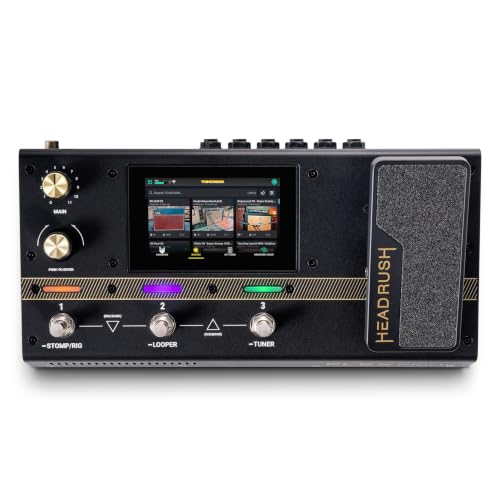
Top Recommendation: HeadRush Flex Prime Electric Guitar Multi-Effects Pedal
Why We Recommend It: It offers a robust 700+ premium emulations, NAM support with direct TONE3000 access for deep tone cloning, and a built-in USB audio interface for macOS/Windows recording. The 4″ color touchscreen and 3 customizable footswitches enable quick tone changes on stage, while Wi-Fi/HeadRush Cloud access expands presets and cloning options. This combination delivers the best balance of live reliability, direct recording quality, and expandability among the tested options.
Best cheap multi effects direct recording: Our Top 5 Picks
HeadRush Flex Prime Electric Guitar Multi-Effects Pedal |
Pros:
- ✓
- ✓ Great value for money
- ✓ Natural amp/modeling tones
- ✓ Strong live/recording features
- ✓
Cons:
- ✕
- ✕ Learning curve for cloud tools
- ✕ Size may still crowd small boards
- ✕
✕ Slightly bulky for tiny boards
Specification:
| Display |
4-inch responsive color touchscreen |
| Processor/Technology |
Multi-core processor with NAM (Native Neural Amp Modeler) support |
| Connectivity/Storage |
onboard Wi‑Fi with HeadRush Cloud access; USB audio interface for macOS/Windows; Dropbox integration |
| Audio I/O |
1/4″ guitar input, 1/4″ expression input, 1/4″ stereo FX loop with 4-cable method, 1/4″ main outputs, 1/8″ headphones output, 1/8″ stereo aux input, 1/8″ MIDI I/O |
| Library/Content |
700+ premium amp/cab/mic/impulse response models; NAM amp captures via Tone3000; 10,000+ exclusive rigs/clones via HeadRush Cloud |
| Footswitch/Controls |
3 customizable footswitches with color LEDs; built-in assignable expression pedal with toe switch and adjustable tension |
You know that moment when you want to lay down ideas fast without chasing a hundred cables or juggling presets? The HeadRush Flex Prime starts by pulling you away from the tangle and right into a flexible, gig-ready workflow.
I grabbed it, pressed the 4″ color touchscreen, and felt the responsive vibe immediately—it’s not just a toy; it’s a compact studio in a pedalboard shell.
The first thing that stood out was how natural the amp and mic models sounded right out of the box. You’ll hear dynamic response that feels alive, whether you’re dialing a punchy rock tone or a glassy clean for jazz-lite progressions.
The NAM support and the TONE3000 access let you explore deeper tones without hunting through manuals for hours.
I spent a chunk of time looping ideas with the Pro Looper and MIDI sync, and the workflow clicked quickly. The USB audio interface made recording straight into my DAW painless, with hands-free tone editing that kept my guitar in the spotlight while I tweaked beats and drums from the built-in rhythm engine.
Wi‑Fi and HeadRush Cloud are more than gimmicks here. I browsed rigs, saved a few favorites, and even shared a couple with a friend who runs a tiny studio.
The cloud library and Dropbox transfer kept my project moving when I swapped rigs between sessions.
Physically, the chassis is sturdy enough for road use, and the three customizable footswitches plus the onboard expression pedal give you quick access during a live set. It’s a surprisingly compact beast that fits on a crowded board without feeling top-heavy.
If you’re after a versatile, affordable multi-FX with real-world tone, flexible recording options, and community-driven presets, this one hits the sweet spot without demanding a gear tax on your wallet.
Soundcraft FX16ii Compact Recording/Live Lexicon Effects

Pros:
- ✓ Compact 16-channel versatility
- ✓ Loud, usable Lexicon effects
- ✓ Repositionable rack panel
Cons:
- ✕ Limited onboard effects depth
- ✕ Slightly busy front panel
Specification:
| Input channels |
26 inputs (16 mono mic channels + 4 stereo returns) |
| Onboard effects |
Built-in 24-bit Lexicon digital effects processor |
| Mixing architecture |
4-bus with sub-group routable to main mix |
| Direct recording outputs |
Direct outputs for multi-track recording individually |
| Rack compatibility |
Rear panel can be repositioned for rack mounting |
| Price |
$1,285.00 |
I pulled the FX16ii onto the desk and the first thing that stood out was how compact the footprint is for a 16-channel mixer with Lexicon effects. I pushed up the built-in reverb just to hear how the room transforms, and the sound stayed punchy rather than bloated, which is refreshing after fussy DSP pedals.
The front panel aluminum look and the surprisingly sturdy knobs give you a sense you’re not babysitting a budget model.
You’ll notice the 26 inputs and 16 mono mic channels feel like a real mixer could still travel with you. The built-in Lexicon effects processor is surprisingly capable, and it’s quick to dial in a usable vocal slap or a subtle mix bus delay.
I appreciate how the direct outputs feed multi-track recording without chasing latency hassles, which makes tracking feel immediate, not ceremonial.
The rear panel can be repositioned for rack mounting, which is a small detail that saves space in a portable rig or studio setup. The 4-bus architecture with sub-group routing means you’re not juggling a wall of mute buttons to get a cohesive drum or band mix.
It’s the kind of practical design that makes you think, “I’ll actually use this on real gigs.”
Live use felt solid; the gain staging is forgiving, and the Lexicon effects don’t fight you when you’re pushing for loudness. If you’re balancing multiple mics and a few musical sources, you’ll appreciate the quick routing options and the direct route outputs for your DAW or recorder.
It feels like a value-forward choice that doesn’t skimp on sonic character.
Overall, the FX16ii is a practical, no-nonsense tool that blends reliable live capability with flexible recording options. It won’t reinvent your workflow, but it will smooth over the rough edges with decent reverb, delay, and a thoughtful layout.
MOOER GE150 Plus Li Black Guitar Multi-Effects Pedal
Pros:
-
✓
Solid performance
-
✓
Good value
-
✓
Well designed
|
Cons:
-
✗
Limited color options
-
✗
Minimal accessories included
|
Specification:
| Preset Capacity |
Up to 198 patch presets |
| Power and Battery |
Built-in rechargeable battery with 9 hours of playback time |
| Looper and Rhythm Features |
80-second stereo looper; 40 integrated drum patterns; 10 metronome modes |
| Effect and Model Details |
55 preamp models; effects include reverb, modulation, dynamic enhancements; supports NAM models and MNRS (GNR/GIR) files via cloud platform |
| Connectivity and Control |
USB-C for PC software integration (preset editing, data management, firmware updates); OTG for mobile audio recording; AUX input for external backing tracks; built-in expression pedal |
| Playback/Live Features |
Spill-over function for smooth delay/reverb transitions between presets |
< p>You used to carry two pedals, a Bluetooth speaker, and a tangle of cables just to jam for 15 minutes outside. Today, you slip the MOOER GE150 Plus Li into your bag, press one switch, and instantly hear a wide, chewy guitar tone without hunting for outlets or adapters.
It feels like a tiny recording studio you can carry in a pocket or guitar case.
< p>The build is surprisingly compact for a full-featured multi-effects unit, and the built-in 9-hour battery means you’re not tethered to a desk. I appreciated the sturdy feel of the pedal’s enclosure and the responsive, almost tactile feedback from the 3 footswitches. The expression pedal adds real dynamics, letting you push filter sweeps or gain changes in real time while you play.
< p>Touching the presets is straightforward: you can dial in up to 198 patches, with 55 preamp models that sound surprisingly usable in a live context. The cloud access for NAM-based models and MNRS files is a nice bonus, letting you expand your palette without buying more hardware. The spill-over feature keeps delays and verbs from cutting off when you switch patches, which is exactly what you want during a live capture or looping session.
< p>The looper is wonderfully approachable—80 seconds of stereo looping with three footswitches to trigger phrases, overdubs, or dry solos. The drum patterns and metronome features are handy practice tools, and the USB-C port makes firmware updates and DAW integration painless. I used the aux input to jam along with a backing track from my phone, and the latency stayed sensible, which is crucial when you’re sketching ideas on the fly.
< p>Overall, you’ll find the GE150 Plus Li nails the portable, budget-friendly niche. It’s not a boutique pedalboard, but for show-ready tones, quick demos, and bedroom jamming, it checks most boxes without breaking the bank. If you want a complete, travel-friendly rig that travels well from bedroom to stage, this is a solid companion.
< p>PROS:
< ul>
< li>Compact, travel-friendly
< li>Long battery life
< li>Rich preset options
< p>CONS:
< ul>
< li>Onboard screen could be brighter
< li>Some presets feel syrupy at extremes
Soundcraft Signature 22MTK Analog 22-channel Multi-track
Pros:
- ✓ Solid build quality
- ✓ Warm, quiet preamps
- ✓ Studio-grade effects
Cons:
- ✕ Not the smallest footprint
- ✕ Higher price point
Specification:
| Preamps |
Iconic Soundcraft Ghost mic preamps |
| EQ |
Soundcraft sapphire British EQ with sweepable mid-bands per channel |
| Effects |
Dual-engine Lexicon effects (reverbs, delays, choruses, modulations) |
| Dynamics |
Input-channel dbx limiters (high-ratio compressors) |
| Channels |
22-channel analog mixer |
| Construction |
Robust metal construction for tour-grade build quality and reliability |
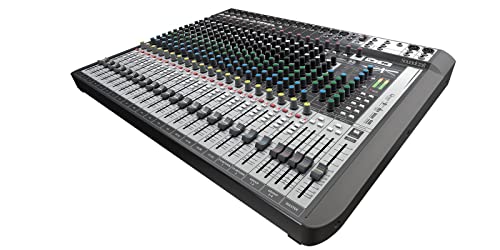
The first time I opened the Soundcraft Signature 22MTK, the weight of the chassis surprised me—solid metal, not plastic, with those familiar Ghost preamps peeking out from behind the faceplate. The click of the fader caps under my fingertips felt reliable, and the layout immediately screamed “workflow-friendly” rather than gimmicks.
From there, I plugged in a couple of mics and a guitars’ DI, and the sapphire EQs—those sweepable mids—made my voice sit right without fighting the room. You’ll notice the preamps stay quiet, even when you push input gains a bit, which is exactly what you want for on-the-fly tracking without hiss.
The dual-engine Lexicon effects surprised me in a good way. Reverbs and delays feel studio-grade, not toyish, and they sit nicely in the mix without stepping on the guitars or vocals. The dbx limiters on the inputs gave me a safety net during loud takes, which is reassuring when you’re chasing performance and don’t want to babysit meters.
Real-world use is where this unit shines: you can route channels with ease, bounce stems, and still have a compact footprint on your desk. It’s sturdy enough to handle a few on-road sessions, yet approachable enough for a home studio setup. The direct recording path remains clean, letting you capture tracks that translate well when you mix later.
If you’re upgrading from a basic interface and want real analog warmth without breaking the bank, this is the kind of balance you’ll appreciate. It’s not the smallest desktop rig, but the sound, the feel, and the effects depth make it worth the price for a committed, versatile setup.
The love comes from small touches: the individual channel controls, the tactile EQ knobs, and the reassuring “solid” feel when you adjust the master out. It’s a setup you won’t outgrow quickly, especially if you value hands-on editing and console-like ergonomics.
Bottom line: you get robust preamps, great dynamics control, and authentic effects without a boutique price tag. It’s a workhorse that makes you want to keep recording, not just tinker.
Zoom B6 Bass Multi-Effects 100+ Effects, Amp Modeling + DI

Pros:
- ✓ Solid build, nice feel
- ✓ Quick, tactile touchscreen
- ✓ Flexible DI options
Cons:
- ✕ Limited onboard memory
- ✕ Bluetooth could be smoother
Specification:
| DI Models (Bass) |
Two tube and two solid-state DI models with 88.2 kHz effects processing |
| Sample Rate for DI/Effects Processing |
88.2 kHz |
| Signal Chain Flexibility |
Drag-and-drop up to 6 effects in signal chain via touchscreen |
| Inputs and Impedance Range |
Two inputs with adjustable impedance from 1 MΩ to 10 MΩ; A/B switcher for seamless bass switching |
| Looper and Storage Capacity |
2 hours of loops saved to SD card; supports up to 256 files |
| Connectivity and App Support |
Guitar Lab compatibility for patches; optional BTA-1 Bluetooth adapter for wireless control via Zoom B6 app |
You pop the B6 out of the box and the first thing you notice is the weight—solid enough to feel sturdy on a coffee table, yet light enough to carry all night without dragging you down. The matte black shell has a tactile grip that doesn’t slip when your hands get sweaty during a gig.
The touchscreen responds with a satisfying little snappy click, and dragging a few effects into a chain feels instant and intuitive. You can see the two DI modes for bass right there, which makes you think about studio tones before you even hit a patch.
It’s the kind of device that makes you want to noodle, not fight with menus.
Two inputs with adjustable impedance are a thoughtful touch. You can flip between electric, acoustic, and upright bass without reconfiguring cables mid-song, which is exactly what you need in a live setting.
The A/B switcher is quiet and reliable, so you don’t worry about pops or glitches between instruments.
Looping is surprisingly generous for a budget rig. Two hours of loops saved to SD card might sound niche, but it’s a lifesaver for practice sessions on the go.
And those 68 rhythm patterns? They’re handy for dialing in a pocket of tempo without firing up a full metronome.
The USB-like feel of the Bluetooth and Guitar Lab integration makes future patch hunting feel almost seamless. You’ll notice the 88.2kHz processing keeps bass lows tight while preserving highs, which matters when you’re layering with other tracks in a mix.
If you’re chasing an affordable but capable all-in-one for live gigs and home recording, the Zoom B6 delivers a compelling blend of tone options, ease of use, and practical features that actually fit real-world workflows.
What Are the Key Features to Look for in a Cheap Multi Effects Unit for Direct Recording?
When searching for the best cheap multi effects unit for direct recording, consider the following key features:
- Sound Quality: The audio quality should be clear and professional, as it directly affects the final output of your recordings. Look for units that offer high-resolution processing and minimal noise to ensure that your sound remains crisp and clean.
- Variety of Effects: A good multi effects unit should include a wide range of effects such as reverb, delay, modulation, and distortion. This variety allows you to experiment with different sounds and find the perfect tone for your recordings.
- User-Friendly Interface: An intuitive interface with easy-to-navigate menus and controls can significantly enhance your recording experience. Look for units with clear displays and straightforward controls that allow for quick adjustments during sessions.
- Portability: If you plan to record on the go, a lightweight and compact design is essential. A portable unit can easily fit into your backpack and be used in various settings, making it ideal for musicians who travel.
- Direct USB Connectivity: Having a unit that offers direct USB output simplifies the process of connecting to your computer for recording. This feature ensures that you can easily transfer your audio without the need for additional equipment.
- Editing and Preset Options: Look for features that allow you to edit effects and save presets for easy access later. This capability can save time in the studio by allowing you to quickly recall your favorite settings.
- Durability: A sturdy build is important, especially if you plan to use the unit frequently or transport it often. Check for materials and construction quality to ensure it can withstand regular use.
- Price Point: Since you’re looking for a cheap option, make sure the unit offers good value for money. Compare features against the price to find a unit that meets your needs without exceeding your budget.
How Does the Sound Quality of Budget Multi Effects Units Compare to Higher-End Models?
| Aspect |
Budget Multi Effects Units |
Higher-End Multi Effects Units |
| Sound Clarity |
Generally decent but can lack depth and detail in sound reproduction. |
High fidelity with clear, detailed sound that captures nuances effectively. |
| Effects Range |
Limited effects with fewer customization options for users. |
Extensive effects library with advanced customization and modulation options. |
| Build Quality |
Often made from lighter materials; may not withstand heavy use. |
Robust construction with high-quality materials; designed for longevity. |
| Price |
More affordable, suitable for beginners or budget-conscious musicians. |
Higher price point, justified by superior performance and features. |
| Examples |
Zoom G1X Four, Behringer FX2000 |
BOSS GT-1000, Line 6 Helix |
| Sound Quality Metrics |
Frequency Response: 20Hz – 20kHz, Signal-to-Noise Ratio: ~80 dB |
Frequency Response: 20Hz – 40kHz, Signal-to-Noise Ratio: ~100 dB |
Which Integral Features Enhance the Versatility of Cheap Multi Effects for Various Musical Styles?
The integral features that enhance the versatility of cheap multi effects for various musical styles include:
- Multiple Effect Types: These devices typically offer a wide range of effects including reverb, delay, distortion, modulation, and more.
- Preset Options: Many multi effects come with preset patches that cater to different genres, allowing users to quickly switch between styles.
- Customizable Parameters: The ability to tweak effect settings gives musicians control over their sound, enabling them to tailor effects to fit specific musical contexts.
- Direct Recording Capability: This feature allows users to connect directly to recording equipment, making it easier to capture high-quality sound without needing additional gear.
- Built-in Drum Machines or Loops: Some models include rhythm features that can help musicians practice or compose, adding an extra layer of versatility.
- Compatibility with Other Gear: Many multi effects units are designed to work seamlessly with various instruments and recording setups, enhancing their utility in different environments.
Multiple Effect Types: The availability of various effect types is crucial as it allows musicians to explore different soundscapes without needing separate, expensive pedals. From lush reverbs to gritty distortions, these effects can be combined in unique ways to suit different genres such as rock, jazz, or electronic music.
Preset Options: Presets serve as starting points for users, particularly beneficial for those who may not have extensive experience in sound design. By providing genre-specific presets, these devices help musicians quickly find the perfect tone for their style, whether it’s a smooth jazz guitar sound or a heavy metal lead.
Customizable Parameters: Customizability is essential for musicians who wish to create a unique sound. By allowing users to manipulate parameters like depth, rate, and feedback, these multi effects empower musicians to craft their signature tones, making it easier to switch between styles without losing their identity.
Direct Recording Capability: Direct recording is a game-changer for musicians looking to produce high-quality tracks from home. This feature eliminates the need for microphones and amplifiers, enabling a cleaner signal to be recorded directly into a digital audio workstation (DAW), which is particularly useful for home studio setups.
Built-in Drum Machines or Loops: The inclusion of built-in rhythms can stimulate creativity and assist in songwriting. These features allow musicians to easily add a rhythmic foundation to their compositions, making it easier to experiment with timing and groove across various styles.
Compatibility with Other Gear: A multi effects unit that integrates well with other musical equipment, such as MIDI controllers and audio interfaces, enhances its versatility. This compatibility ensures that musicians can use the device in different setups, whether performing live or recording in the studio, thus expanding its usability across a range of musical contexts.
What Are the Top Recommendations for Cheap Multi Effects Units for Direct Recording?
Some of the best cheap multi effects units for direct recording include:
- BOSS ME-80: This unit combines a pedalboard-style interface with a vast array of effects, making it user-friendly for direct recording. It features customizable effects chains, allowing musicians to create unique sounds, while the built-in USB interface ensures high-quality audio capture directly to your DAW.
- Zoom G3X: The G3X offers a range of amp models and effects, along with an easy-to-navigate interface equipped with a built-in expression pedal. It also includes a looper and USB connectivity for direct recording, making it an excellent choice for home studios and practicing musicians.
- Digitech RP360XP: This multi-effects processor comes with over 80 effects and amp models, providing versatility for various recording needs. Its intuitive design includes a built-in tuner and USB interface for direct recording, which simplifies the process of capturing your guitar tracks with high fidelity.
- Line 6 POD HD500X: While slightly more expensive, the POD HD500X can often be found at a budget-friendly price and offers an extensive library of effects and amp simulations. It supports direct recording with its high-definition audio interface and is known for its robust build quality and performance capabilities.
- Mooer GE150: This compact unit is ideal for guitarists looking for quality sound without breaking the bank. With over 50 effects, multiple amp models, and a user-friendly interface, it also features USB connectivity for easy recording, making it a great choice for those who need portability.
How Do User Reviews Reflect the Performance of Popular Budget Multi Effects Units?
The user interface is another critical aspect, as many musicians value a straightforward setup that allows them to quickly access and manipulate effects. Reviews often reflect how a confusing interface can lead to frustration, while a well-designed layout can facilitate a smoother creative process.
Durability is frequently mentioned, especially by touring musicians who require reliable gear. User reviews often share experiences regarding how well these units hold up over time, particularly in demanding environments, which can influence purchasing decisions.
Versatility is a significant factor for users, with many reviews praising units that offer a wide range of effects suitable for different musical genres. This adaptability allows musicians to experiment with their sound without needing multiple devices.
Finally, value for money is a recurring theme in reviews, with users often comparing features and performance against the price tag. Positive reviews typically highlight units that provide a robust set of features without breaking the bank, making them appealing choices for budget-conscious musicians.
Which Multi Effects Units are Known for Their User-Friendly Features and Good Value?
Some of the best cheap multi effects units known for their user-friendly features and good value are:
- BOSS ME-80: This unit combines simplicity with versatility, featuring an intuitive layout that allows users to quickly access various effects.
- Zoom G3Xn: The G3Xn offers a wide range of effects and amp models, all while presenting them in a straightforward interface that is easy to navigate.
- Digitech RP360XP: Known for its user-friendly controls, this model provides a variety of presets and effects that cater to both beginners and experienced players.
- Line 6 POD HD500X: Although slightly higher in price, this unit is often praised for its ease of use and robust feature set, making it a solid investment for direct recording.
- Behringer FX2000: This affordable option is packed with effects and has a simple layout, making it ideal for those looking for good value without complexity.
BOSS ME-80: The ME-80 features a pedalboard-like design, allowing users to engage effects with footswitches easily. It also includes a built-in expression pedal and a plethora of effects and amp simulations, making it suitable for various musical styles. Its user-friendly interface is perfect for both live performances and studio recording.
Zoom G3Xn: This multi effects unit stands out for its large LCD display and easy-to-use interface, which helps users create complex signal chains without confusion. With over 70 built-in effects and the ability to import additional sounds, it supports a wide range of musical genres. It also features an onboard looper for added creativity in live settings.
Digitech RP360XP: The RP360XP is designed with beginners in mind, featuring a straightforward layout and a large array of presets that can be easily customized. It offers a comprehensive range of effects and amp models, providing good quality at a budget-friendly price. Its USB connectivity allows for easy recording directly to a computer, making it a versatile tool for home studios.
Line 6 POD HD500X: While it may be a bit more expensive, the POD HD500X is revered for its intuitive interface and high-quality sound. It enables users to create complex signal chains and offers extensive customization options, making it ideal for direct recording. Its robust build and wide range of effects make it a favorite among guitarists looking for long-term reliability.
Behringer FX2000: The FX2000 is a budget-friendly effects unit that doesn’t compromise on quality, featuring a range of effects suitable for different music styles. Its simple layout allows users to dial in sounds quickly, making it user-friendly for those new to multi effects processing. The compact design also makes it easy to integrate into any setup, whether for live performances or home recording.
What Are the Benefits of Using Multi Effects for Direct Recording?
The benefits of using multi effects for direct recording include flexibility, cost-effectiveness, and enhanced sound quality.
- Flexibility: Multi effects units allow musicians to easily switch between different sounds and effects without the need for multiple pedals or devices. This versatility is particularly useful in live settings or studio recordings where quick adjustments may be necessary to achieve the desired tone.
- Cost-effectiveness: Investing in a multi effects unit can save money compared to purchasing individual pedals for each effect. This is especially beneficial for beginners or those on a budget, as they can access a wide range of effects and sounds without breaking the bank.
- Enhanced sound quality: Many multi effects units are designed with high-quality digital processing capabilities, resulting in clear and professional-sounding recordings. The ability to apply effects directly during the recording process can lead to a more polished final product.
- Convenience: Multi effects units often come with a variety of built-in presets and customizable settings, allowing users to quickly find their ideal sound. This convenience is enhanced by the ability to integrate the unit with recording software, streamlining the recording process.
- Portability: Many multi effects units are compact and lightweight, making them easy to transport for live performances or studio sessions. This portability means that musicians can maintain consistency in sound regardless of the location.
How Can Multi Effects Units Improve the Recording Process for Musicians and Producers?
Multi effects units can significantly enhance the recording process for musicians and producers by offering a wide range of sound shaping options in a compact form.
- Versatility: Multi effects units provide a multitude of effects such as reverb, delay, distortion, and modulation, allowing musicians to experiment with different sounds and textures without needing multiple devices.
- Cost-Effectiveness: Investing in a multi effects unit can be more economical than purchasing individual pedals or processors, especially for those on a budget, making them an ideal choice for producers looking for the best cheap options.
- Ease of Use: Many multi effects units come with user-friendly interfaces and presets that facilitate quick adjustments, helping musicians to efficiently dial in their desired sounds during recording sessions.
- Direct Recording Capability: These units often include features for direct recording, enabling musicians to connect them directly to audio interfaces or mixers, thus simplifying the recording chain and reducing the need for additional gear.
- Portability: Multi effects units are typically compact and lightweight, making them easy to transport for live performances or studio sessions, allowing for creativity on the go.
Versatility in multi effects units allows musicians to explore a wide range of sounds, from classic to experimental, all within a single device. This means that producers can capture a variety of sonic textures in a single take, enhancing the creative process.
Cost-effectiveness is particularly beneficial for those on a budget, as these devices can serve multiple functions without the need for separate purchases. This is especially important in home studios where space and finances may be limited.
Ease of use is a significant advantage, especially for those who may not be as technically inclined. Many models feature intuitive controls and presets that can help musicians quickly find and adjust their desired effects during recording, streamlining the workflow.
Direct recording capability allows musicians to plug their instruments directly into the unit, which can save time and reduce the complexity of the recording setup. This can lead to a more straightforward and efficient recording process, allowing for immediate playback and adjustments.
Portability adds another layer of convenience, as musicians can easily take their multi effects units to rehearsals, gigs, or different studio environments. This flexibility encourages experimentation and spontaneity, which can lead to unique and unexpected musical outcomes.
How Can You Optimize Your Direct Recording Setup When Using a Multi Effects Unit?
To optimize your direct recording setup with a multi effects unit, consider the following strategies:
- Choose the Right Multi Effects Unit: Selecting a budget-friendly multi effects unit that offers quality sound and versatile features is crucial. Look for units that include a wide range of effects, amp simulations, and good direct recording capabilities to get the most value for your money.
- Utilize Direct Output Options: Many multi effects units come with direct output options specifically designed for recording. Using these outputs can help you capture a clean and direct signal without the need for miking, which can save time and ensure a consistent sound.
- Optimize Your Signal Chain: Properly setting up your signal chain can significantly enhance your sound. Place the effects in a logical order—typically starting with dynamics, followed by modulation, and finishing with time-based effects—to create a well-balanced tone before recording.
- Experiment with EQ Settings: Adjusting the EQ settings on your multi effects unit can help tailor your sound for the recording environment. Pay attention to the highs, mids, and lows to ensure your tone complements the mix and stands out in the final recording.
- Use Quality Cables and Interfaces: Invest in good quality cables and an audio interface to ensure a clean signal transfer from your multi effects unit to your recording device. Poor quality cables can introduce noise and degrade the sound quality, negating the benefits of your effects unit.
- Monitor with Headphones: Using closed-back headphones can help you accurately monitor your sound while recording. This allows you to hear how the effects are interacting with the direct signal, enabling you to make real-time adjustments for the best result.
- Record Multiple Takes: Don’t hesitate to record multiple takes with different effects settings. This gives you a variety of sounds to choose from in post-production and can lead to discovering unexpected tones that work well in the mix.
- Explore Software Integration: Many multi effects units offer the ability to integrate with recording software via USB. This can provide additional editing capabilities and access to additional plugins, further enhancing your recording setup.
What Best Practices Should You Follow for Achieving High-Quality Recordings with Multi Effects?
To achieve high-quality recordings with multi effects, consider the following best practices:
- Use Quality Equipment: Investing in a good quality audio interface and microphones can significantly enhance your recording quality. Cheap equipment can introduce noise and distortion, negatively impacting your sound regardless of the effects used.
- Optimize Your Recording Environment: A well-treated room can reduce unwanted reflections and ambient noise. Use acoustic panels or even DIY solutions like blankets to minimize echo and improve clarity in your recordings.
- Choose the Right Effects: Select effects that complement your sound rather than overwhelm it. Experiment with different combinations of reverb, delay, and modulation to find the right balance that enhances the overall mix without muddying it.
- Proper Gain Staging: Ensure that your input levels are set correctly to avoid clipping while still being high enough to capture detail. Monitoring levels throughout the recording process helps maintain a clean and dynamic sound.
- Utilize Direct Input (DI) Techniques: For instruments, using a DI box can provide a clean signal that retains clarity when processed through multi effects. This is particularly useful for electric guitars and basses, where capturing the true tone is essential.
- Record in High Bit Depth and Sample Rate: Recording at high settings (e.g., 24-bit/96 kHz) allows for greater dynamic range and detail. This ensures that when you apply effects, the quality remains intact even after processing.
- Monitor Effect Levels Carefully: Keep an eye on how the effects are interacting with the original signal. Too much effect can make the sound unrecognizable, so aim for subtlety that enhances the original performance.
- Experiment with Post-Processing: After recording, you can always adjust the effects in your digital audio workstation (DAW). This flexibility allows you to fine-tune your sound and ensures that the final mix sounds polished and professional.
Related Post:

