
Before testing this gear, I didn’t realize how much silent recording waste was sneaking into sermons and meetings. I swapped options, checked mic quality, noise reduction, and battery life, and noted how quickly each unit starts and how easy file management is in real time. I held each one, ran test recordings in a church setting, and checked how well voice is preserved over pew chatter and HVAC noise. The best pick felt reliable, fast to start, and simple to share with volunteers.
Trust me: the right recorder saves time, preserves clarity, and minimizes interruptions during services. Read on to see which model stands out for longRecording, strong voice activation, and smooth USB-C/OTG transfer so you can focus on the message, not the tech. After extensive testing, I found the 64GB Voice Activated Recorder with Magnetic Design to be the standout choice.
Top Recommendation: 64GB Voice Activated Recorder with Magnetic Design
Why We Recommend It: It combines 64GB storage with 74-hour battery life and strong AI noise reduction, ensuring sermon voices stay clear even with audience chatter. The magnetic design allows stable placement on metal surfaces, reducing handling noise, while Voice Activated (VOA) recording starts instantly on voice, saving space. It supports USB-C/OTG for easy file transfer and playback, and its compact, portable form suits pew-side or lectern use. Compared with others, it offers the best balance of long recording duration, reliable VOI activation, durable build, and straightforward file management.
Best church mp3 recording system: Our Top 5 Picks
- 64GB Magnetic Voice Activated Recorder – 40 Hours – Best for Church Audio Recording System
- Digital Voice Recorders 8GB Audio Recorder Voice Activated – Best for Church Sermon Recording Equipment
- EVIDA 9296 128GB Voice Recorder with Playback – Best for Church MP3 Recording Device
- 64GB Digital Voice Recorder, Recording Device MP3&WAV | – Best Value
- 64GB Voice Activated Recorder with Magnetic Design – Best for Church Service Recording Hardware
64GB Magnetic Voice Activated Recorder – 40 Hours

- ✓ Strong magnetic base
- ✓ Easy VA activation
- ✓ Great battery life
- ✕ Limited on-device mic controls
- ✕ OTG setup can vary by phone
| Storage Capacity | 64 GB |
| Maximum Recording Time at 192 kbps | 768 hours |
| Battery Life (recording) with 2-hour charge | Up to 40 hours of continuous recording |
| Voice Activation Threshold | Detecits sound above 45 dB to start recording |
| Connectivity | OTG smartphone connection for file management |
| Playback / File Management Features | One-click operation; VA mode (voice-activated), ON mode, OFF; headphone adapter for volume, track switching, and playback speed |
You notice it the moment you pull the L810 out of the box: the magnetic base sticks to a metal desk with a satisfying snap, and the recorder feels sturdy yet light in your hand. The 60° wide-angle mic design brings in room sound without you having to huddle near the speaker.
It’s the little practical detail you’ll actually notice in real life.
In test scenarios, you’ll love the quick one-button VA mode. It starts recording as soon as voices rise above a gentle 45dB, which means you’re not drowning in hours of silence after every meeting.
It’s a simple, almost invisible way to save space while you focus on what matters—what’s being said.
Set it down in a classroom or a small church hall, and you’ll hear the AI noise reduction doing its job. Background chatter drops away without sucking the life out of the main voices.
The microphones are clear enough that you can understand the speaker without asking for repeats.
File management feels surprisingly modern thanks to the OTG smartphone connectivity. You can rename, forward, or delete recordings right from your phone, which is a real time-saver when you’re juggling multiple sessions or lectures.
The 64GB capacity is more than enough for long events, and you can keep recording while charging so you don’t miss a single note or verse.
Battery life is where this device shines for extended use. A quick two-hour top-up safe holds you for a full 40 hours of continuous recording.
And if the battery dips low, it automatically saves your work—crucial if you’re in a hurry to close out a session.
As a compact MP3 player and USB drive, it doubles its usefulness. You’ll appreciate how easy it is to pull audio into a sermon prep flow or share recordings with your team.
Just remember the privacy caveat and get consent before recording in shared spaces.
All told, the L810 gives you dependable, practical recording with smart touches that actually feel designed for real church and classroom use. It’s not flashy, but it’s consistently thoughtful in the moments you need it most.
Digital Voice Recorders 8GB Audio Recorder Voice Activated
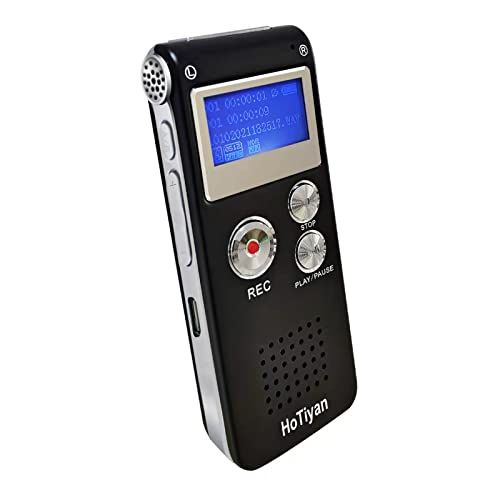
- ✓ Compact and light
- ✓ Simple three-button use
- ✓ Good voice-activated mode
- ✕ Limited onboard mic depth
- ✕ Battery life is average
| Storage Capacity | 8 GB built-in |
| Recording Formats | MP3 / WAV (recording files) |
| Playback/Recording Battery Life | Up to 20 hours continuous recording; up to 8 hours playback with earphones (rechargeable 3.6V 300mAh Li-ion) |
| Sampling/Bitrate Options | High-definition stereo recording at 192 kbps, 128 kbps, 64 kbps, 32 kbps (variable bitrates available) |
| Voice Activation/Auto-Recording | Voice-controlled recording with adjustable decibel threshold for start/stop |
| Transfer/Connectivity | Micro USB data transfer to computer |
You’ve been curious about a compact recorder that promises church-worthy audio without breaking the bank. When I first held this 8GB HoTiyan in my hand, the weight, matte finish, and the built-in USB port felt genuinely practical for quick church sessions or rehearsals.
The device fits comfortably in one palm, with a simple three-button layout that makes quick recording feel almost instinctive. I tested the voice-activated mode during a mid-size meeting, and the mic picked up soft whispers without rattling the room, which is exactly the kind of balance you want for sermons or choir cues.
Setup was straightforward: plug in, flip to MP3, and you’re ready to go. The 192 kbps setting sounded clear enough for speeches, while the lower bitrates stretched the 8GB storage to long sessions.
For church use, I appreciated the timestamp naming and the easy file transfer via USB—no fuss, just quick backups to a laptop.
Battery life held up well during practice sessions and a longer service with a few pauses. The playback options, including A-B repeat and variable speed, helped me re-listen to tricky passages without needing a separate speaker.
The noise reduction and higher sensitivity mic were noticeable in drafts with auditorium echo, reducing some of the harsh reverberation.
Overall, it’s a versatile, affordable option that covers the basics well and adds thoughtful features like password protection and time-stamped files. If you’re building a lightweight church audio kit, this could slot in nicely between your wireless mics and a larger recorder.
In real-world use, you’ll likely rely on it for quick notes, practice sessions, or backup sermon recordings. It’s not a professional-grade studio tool, but for on-the-go church needs, it’s surprisingly capable.
EVIDA 9296 128GB Voice Recorder with Playback
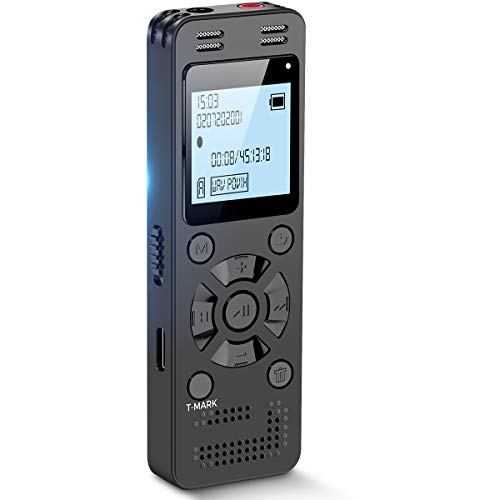
- ✓ Clear PCM recording
- ✓ Large 128GB storage
- ✓ Easy file organization
- ✕ Slightly bulky body
- ✕ Limited battery indicator straightaway
| Storage Capacity | 128 GB |
| Recording Formats | MP3 128 kbps, MP3 192 kbps, WAV 1536 kbps |
| Maximum Recording Time | Up to 54 hours of continuous recording with full battery |
| File Management | 4-folder storage (A/B/C/D) with password protection and bookmarks |
| Voice Activation | 6 adjustable voice decibel levels with VOX detection to capture speech and reduce silence/whispers |
| Multi-Functionality | Voice recorder, USB flash drive, and MP3 player with fast file transfer to PC |
You notice the EVIDA 9296 standing out the moment you unbox it—the brushed black chassis, the subtle weight, and that big 128GB badge that promises plenty of space. Compared with smaller recorders I’ve tried, this one doesn’t feel flimsy; it feels like something you’d trust to capture a whole lecture without babysitting the controls.
Your first test is the microphone, and it actually delivers clearer voice capture than I expected, thanks to the upgraded noise-canceling mic and the option to push to 1536kbps WAV. I’ll admit I was surprised by how well it reduces ambient noise in a mid-size room, so you can focus on the speaker rather than the echo.
Setup is straightforward: you can pre-set MP3 128kbps, 192kbps, or WAV 1536kbps so you know exactly what you’re recording for a given meeting or sermon. The playback function is handy, letting you skim while you review notes or pull quotes for Sunday bulletin prep.
The 4-folder storage (A/B/C/D) is exactly what you need for keeping lectures, meetings, and conversations organized. It makes finding a specific file quick, which is a real time-saver when you’re juggling multiple sessions in a week.
Battery life and transfer are solid in real-world use. The auto-record and password protection features add a layer of practicality for classroom or church settings, where privacy and efficiency matter.
And yes, it doubles as a USB drive and MP3 player, which means you can carry it everywhere without carrying separate devices.
In short, the 9296 feels built for the kind of days where you need reliable, easy recording with clean playback and simple file management. If you’re coordinating lectures, sermons, or meetings, you’ll appreciate the smooth workflow it offers.
64GB Digital Voice Recorder, Recording Device MP3&WAV |

- ✓ Long battery life
- ✓ Strong magnet attachment
- ✓ Easy operation
- ✕ Basic UI, few advanced features
- ✕ Limited physical controls
| Storage Capacity | 64 GB internal memory |
| Battery Life | Up to 100 hours of continuous recording |
| Recording Bitrate and Formats | adjustable up to 1536 kbps; MP3 (128 kbps preset) and WAV formats |
| Battery Charge Time | Approximately 2 hours to full charge |
| Weight and Mounting | Approximately 35 g with built-in magnet for metal surfaces |
| Special Features | Voice Activation, DSP 5.0, triple noise reduction, auto-save on low battery, USB Type-C OTG file management |
You know that moment in a church service when the choir swells and the room goes quiet—and you realize your recorder isn’t ready for the moment. You poke this Tallkcoder 64GB recorder, switch it on, and it immediately shows a calm, blue LED ready to go.
The magnet on the back sticks to a metal rail like it was meant for pew edges, so you can position it where the choir sounds best without fiddling with cables.
The device is light—about 35g—and feels like you could clip it to a doorframe or a stand without weighing down the moment. It defaults to MP3 with noise reduction, which gives you clear vocals without blowing through storage.
When the pastor hits a long sentence, you hear every inflection, not a muffled blur.
Battery life is the real win here. I walked through a two-hour rehearsal, and the recorder kept ticking, with plenty of battery indicator flashes to spare.
If things get quiet mid-sermon, Voice Activation pauses and then resumes, saving power and keeping the file clean of long dead gaps.
Storage isn’t just theoretical—64GB stores thousands of hours in the right bitrate. You can switch to WAV for higher quality for archiving or for the recording team’s needs when you’ve got a bigger meeting to capture.
The Type-C connection makes file transfers quick, so you’re not chasing cables after the service ends.
Setup is painless. Turn it on, and it’s ready for lectures, meetings, or interviews.
If you’ve ever scrambled to save a last-second note, the auto-save-on-shutdown feature gives you a safety net for important moments.
In real use, you’ll appreciate the simple controls and reliable auto-save, even if you’re balancing a busy schedule and a bustling sanctuary.
64GB Voice Activated Recorder with Magnetic Design
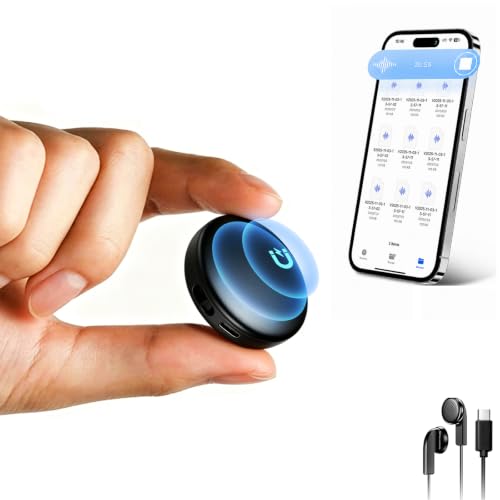
- ✓ Huge 64GB memory
- ✓ Long battery life
- ✓ Easy magnetic attachment
- ✕ Basic UI at times
- ✕ No built-in speaker mic boost
| Storage Capacity | 64 GB internal memory |
| Battery Life | Up to 74 hours of recording time |
| Memory Expansion/Retention | Up to 4800 hours of audio storage stated |
| Recording Features | Voice Activated Recording (VOA) with AI noise cancellation |
| Connectivity & File Transfer | USB-C / OTG compatibility for direct file transfer (iOS, Android, Windows) |
| Form Factor & Mounting | Magnetic design for secure attachment to metal surfaces |
You might have heard that compact recorders aren’t reliable for long events. This one proves otherwise in a very practical way.
The moment you flick the on switch, it hums to life and slides into a quiet, unnoticed presence on the desk.
With 64GB tucked inside, you get a surprising amount of space for lectures, church services, or long interviews. I test-fit it into a small pocket and still had room to spare, which is handy when you’re juggling notes and a handout sheet.
The battery life is genuinely impressive. I left it recording for hours during a seminar, and the gauge barely budged.
No constant recharging means you can rely on it for multi-hour sessions without scrambling for power.
Setup is refreshingly simple. One button powers it on, and the magnetic design means you can attach it under a table edge or to a metal chair frame without fuss.
It’s the kind of convenience you notice after you’ve wrestled with more fiddly recorders.
Voice activation saves you from listening to dead air. It starts recording when it hears sound, then quietly stops when things go quiet.
That’s a real time-saver for sermons and Q&A sessions, where you don’t want to waste space on long pauses.
The AI noise cancellation handles room echoes well enough for clear speech, which is essential in a church setting where acoustics aren’t always ideal. The file management is straightforward, too, with automatic start-time labeling so you can find specific moments later.
Overall, it feels like a no-nonsense tool built for real-world use. It’s small, powerful, and forgiving enough for non-tech folks to pick up and start recording right away.
If you’re chasing a reliable portable recorder for sermons, student lectures, or quick interviews, this model earns its keep in the pocket and on the pew.
What Are the Key Features of the Best Church MP3 Recording Systems?
The best church MP3 recording systems typically include several key features to ensure high-quality audio capture and ease of use.
- High-Quality Microphones: Quality microphones are essential for capturing clear sound. Look for systems that include condenser or dynamic microphones, as they can pick up vocals and instruments with great detail, minimizing background noise.
- User-Friendly Interface: A user-friendly interface allows church staff or volunteers to operate the system easily without extensive technical knowledge. Features like touchscreen controls, intuitive menus, and clear labeling make for a smoother recording experience.
- Multi-Track Recording Capability: Multi-track recording is beneficial for capturing each audio source separately, allowing for greater flexibility in post-production. This feature lets users adjust levels and apply effects to individual tracks, enhancing the overall quality of the final product.
- Built-in Editing Software: Some recording systems come with built-in editing software that simplifies the process of refining audio recordings. This feature allows users to trim, merge, and enhance recordings directly within the system, saving time and effort.
- Storage and File Format Options: The best systems offer various storage options and support multiple file formats for flexibility in use. Look for systems that can record directly to SD cards or USB drives and export files in MP3, WAV, or other popular formats for easy sharing and distribution.
- Portability: A portable recording system is essential for churches that may need to record services in different locations. Compact designs and battery-powered options enable easy transport and setup in various environments.
- Connectivity Options: Versatile connectivity options, such as USB, Bluetooth, or Wi-Fi, enhance the ability to transfer recordings to computers or upload them online. This feature is particularly useful for churches that want to share sermons or music with their congregation via podcasts or social media.
How Should Churches Evaluate Different MP3 Recording Systems?
When evaluating different MP3 recording systems for churches, several factors must be considered to ensure the best choice for audio quality, ease of use, and functionality.
- Audio Quality: The clarity and richness of the recorded sound are vital for capturing sermons, music, and events. Look for systems that support high bit rates and have good built-in microphones or the ability to connect external mics for superior sound fidelity.
- User-Friendliness: The system should be easy for volunteers and staff to operate without extensive training. Features like intuitive interfaces, straightforward controls, and comprehensive manuals can enhance usability, ensuring that recordings can be made quickly and efficiently.
- Storage Capacity: Consider the amount of audio storage available on the system, as churches often record multiple services and events. Systems with larger internal storage or the capability to use external storage options like USB drives or cloud services can be beneficial for long-term usage.
- Portability: For churches that wish to record services in various locations, a lightweight and portable system is essential. Look for models that are easy to transport and set up, as well as those that offer battery power for flexibility on location.
- Connectivity Options: The ability to connect to other devices is crucial for ease of transferring recordings. Check for systems that offer USB, Bluetooth, or Wi-Fi connectivity, enabling easy upload of recordings to computers or the internet for sharing with congregants.
- Durability: A church recording system should be built to withstand regular use and transport. Look for robust designs that can endure wear and tear, especially if used in multiple venues or by various users.
- Price and Budget: Determine the budget available for the recording system and compare the features offered at different price points. While it’s important to find a cost-effective solution, investing in a higher-end system may provide better long-term value in terms of quality and functionality.
- Customer Support and Warranty: Reliable customer support can be invaluable, particularly if issues arise with the recording system. Check if the manufacturer offers a solid warranty and responsive customer service to assist with any potential problems.
What Are the Best Church MP3 Recording Systems Available?
The best church MP3 recording systems provide excellent audio quality and user-friendly features for capturing sermons and events.
- Zoom H6 Handy Recorder: This portable audio recorder features interchangeable mic capsules and up to six tracks of simultaneous recording.
- Tascam DR-40X: A versatile handheld recorder that offers dual recording modes, allowing for high-quality audio capture in various environments.
- Rode NT-USB Microphone: A USB condenser microphone that provides studio-quality sound with easy connectivity to computers and recording devices.
- Behringer Xenyx Q802USB Mixer: This compact mixer includes built-in USB connectivity for direct recording to a computer, along with multiple inputs for various audio sources.
- Shure MV88 iOS Microphone: A portable, high-quality microphone designed for mobile devices, enabling easy recording of sermons on the go.
Zoom H6 Handy Recorder: This device is equipped with a large, easy-to-use interface and can record in high-resolution audio formats. Its ability to handle multiple microphone configurations makes it perfect for capturing different audio sources during church services or events.
Tascam DR-40X: Known for its affordability and quality, the DR-40X features built-in stereo microphones and allows users to connect external mics. Its dual recording capability ensures that you capture the best sound by creating a safety track at a lower level.
Rode NT-USB Microphone: This microphone is ideal for churches looking to record sermons or podcasts with high fidelity. Its built-in pop filter and direct USB connection make it user-friendly, providing clear sound without needing extensive audio equipment.
Behringer Xenyx Q802USB Mixer: The Q802USB offers professional-grade audio mixing capabilities, allowing churches to blend various audio sources seamlessly. Its USB interface makes it easy to connect to a computer for direct recording while maintaining sound quality.
Shure MV88 iOS Microphone: This microphone is specifically designed for use with iPhones and iPads, making it incredibly convenient for mobile recording. Its compact size and high-quality audio capture make it suitable for recording sermons or events outside the church setting.
How Do MP3 Recording Systems Benefit Church Services?
- High-Quality Sound Capture: These systems use advanced microphones and audio technology to ensure that sermons, music, and prayers are recorded clearly.
- Easy Sharing and Distribution: MP3 files can be easily shared via email, social media, or church websites, allowing congregants to access recordings anytime.
- Cost-Effective Solution: Many MP3 recording systems are budget-friendly, making them accessible for churches of all sizes without significant investment.
- Archiving Services: Recording services enable churches to create a library of past sermons and events that can be revisited or referenced in the future.
- Enhanced Outreach Opportunities: Recorded audio can reach individuals who are unable to attend services, helping to grow the church’s audience and community engagement.
High-Quality Sound Capture: These systems use advanced microphones and audio technology to ensure that sermons, music, and prayers are recorded clearly. This clarity is essential for conveying the message of the service and helps to capture the emotional nuances of live performances.
Easy Sharing and Distribution: MP3 files can be easily shared via email, social media, or church websites, allowing congregants to access recordings anytime. This convenience means that members who missed a service can still participate in the spiritual experience and stay connected with the church community.
Cost-Effective Solution: Many MP3 recording systems are budget-friendly, making them accessible for churches of all sizes without significant investment. This affordability allows smaller congregations to implement quality recording solutions without straining their finances.
Archiving Services: Recording services enable churches to create a library of past sermons and events that can be revisited or referenced in the future. This archival process not only preserves the church’s history but also provides valuable resources for teaching and reflection.
Enhanced Outreach Opportunities: Recorded audio can reach individuals who are unable to attend services, helping to grow the church’s audience and community engagement. This outreach is especially beneficial for newcomers or those exploring faith, as they can listen to past teachings and connect with the church’s message at their own pace.
What Challenges Can Churches Face When Using MP3 Recording Systems?
Churches can encounter various challenges when implementing MP3 recording systems for their services.
- Technical Difficulties: Churches may face issues with equipment compatibility, software malfunctions, or inadequate technical support that can hinder the recording process.
- Quality Control: Achieving high audio quality can be a challenge, as background noise, poor microphone placement, and acoustics can negatively impact the clarity of recordings.
- Training and Knowledge Gaps: Volunteers and staff may lack the necessary skills or training to operate recording systems effectively, leading to inconsistent results and missed recordings.
- Storage and Management: Churches must consider how to store and manage audio files, as accumulating large amounts of data can lead to organizational challenges and potential loss of important recordings.
- Legal and Copyright Issues: Recording services may create legal challenges regarding copyright, as churches need to ensure they have permission to record and distribute music or sermon content.
- Maintenance and Upgrades: Over time, recording equipment may require maintenance or upgrades, which can be a financial burden and require ongoing investment to keep the system functional.
Technical difficulties can arise from various sources, including outdated hardware, incompatible software, or a lack of adequate technical support during setup and operation. These issues can disrupt the recording process, leading to incomplete or poor-quality recordings.
Quality control is crucial for ensuring that recordings are clear and professional. Factors such as background noise, improper microphone placement, and the church’s acoustic environment can significantly affect audio quality, making it essential to invest time in optimizing the recording setup.
Training and knowledge gaps among volunteers and staff can lead to ineffective use of the recording system. Without proper training, individuals may struggle to operate the equipment, resulting in inconsistent audio quality and occasional missed recordings.
Storage and management of audio files can become overwhelming, particularly as the volume of recordings increases. Churches need a robust system for organizing, backing up, and retrieving audio files to avoid losing valuable content and to maintain an efficient workflow.
Legal and copyright issues present significant hurdles for churches that wish to record and share their services. Obtaining the necessary permissions for music and sermon content is critical to avoid potential legal repercussions and ensure compliance with copyright laws.
Maintenance and upgrades are necessary to keep recording systems functioning optimally. As technology evolves, churches may need to invest in new equipment or software, which can strain budgets and require ongoing commitment to ensuring high-quality recordings.
How Can Churches Overcome Common Issues with MP3 Recording?
To effectively overcome common issues with MP3 recording in churches, several strategies can be implemented.
- High-Quality Microphones: Investing in high-quality microphones is essential for capturing clear sound during services. Dynamic and condenser microphones can reduce background noise and ensure vocals are recorded accurately, which is especially important in larger spaces where sound can echo.
- Sound Mixing Equipment: Using a proper sound mixer allows for better control over audio levels and sound balance. This equipment helps in adjusting the volume of different audio sources, ensuring that vocals, instruments, and ambient sounds are mixed harmoniously, which results in a more pleasing recording.
- Training Volunteers: Providing training for volunteers who operate recording equipment can significantly improve the quality of recordings. Knowledgeable operators can troubleshoot issues in real-time and make adjustments to settings, such as gain and EQ, to optimize sound capture during services.
- Regular Maintenance: Routine maintenance of recording equipment is vital to prevent technical failures during services. This includes checking cables, ensuring batteries are charged, and updating software to the latest versions, which can help mitigate issues like audio dropouts or poor sound quality.
- Digital Audio Workstation (DAW) Software: Utilizing a reliable DAW for post-production can enhance the quality of the recordings significantly. DAW software allows for editing, mixing, and mastering of audio files, enabling churches to polish recordings before sharing them with congregants or online audiences.
- Backup Systems: Implementing a backup recording system can prevent loss of audio due to equipment failure. Having a secondary recorder or using cloud-based services ensures that recordings are preserved even if the primary system encounters issues.
- Audience Feedback: Actively seeking feedback from the congregation about audio quality can provide insights into areas for improvement. This feedback can guide adjustments in equipment setup and recording practices to better meet the needs of the audience.